 PH
PHRedeemer01
Enthusiast
How does Reset This PC work in Windows 10?
Windows 10 Reset this PC feature can reset itself to its factory default state. It comes with two options, Keep my files and Remove everything.If you choose Keep my files, your computer will boot into Windows recovery environment (WinRE), scan and palce all your files and personal settings aside, install a fresh copy of Windows with Windows recovery image, and then put your personal files and settings back where they were found.
If you choose Remove everything, WinRE will erase and format your C: drive and then install Windows from scratch.
No matter which option you choose, your installed programs will be erased. If you do not want your installed programs lost, you can custom Windows 10 reset image from command prompt and use the custom refresh image to reset your Windows 10 PC beforehand.
Start Windows 10 reset from command line
For those who prefer command line, you can use one command to bring out Windows 10 reset feature.1. Open an elevated command prompt. You can type “cmd” in the search box and right click on the result Command Prompt and then select Run as administrator.
2. From there, type “systemreset” (without quotes). If you want to refresh Windows 10 and install Windows updates, then you should type “systemreset -cleanpc”.
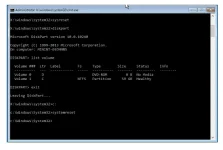
3. Then you can select the option you need to reset your PC.
If your Windows 10 cannot load normally, you can boot into WinRE and select Command Prompt from the recovery options. Command prompt from WinRE the working directory is X:\windows\system32\. Since the systemreset.exe is located in C: drive, you should type “C:” to change the working directory to C: drive.
Notice: sometimes, the drive letter assigned in WinRE may not be the same as normal Windows. So you can type “diskpart” and then use “list volume” command to show the drive letter assigned to each drive.
If WinRE also fails to load you can boot your computer from Windows 10 recovery disk or installation disk to use the recovery options.
If Windows 10 reset failed with no changed were made, then you should check if the WinRE image and reset image are in place. You can run the command “reagentc info” to check the recovery image status.
As mentioned, resetting Windows 10 will remove all the software you installed, which means you have to reinstall a lot of software. What’s worse, you have to reactive, re-login, and re-configure some of the software.
