PH
PHDark Justice
Forum Guru
Hello!
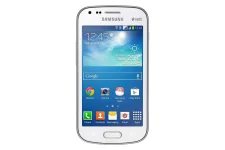
Una sa lahat tuturoan ko po kayo magroot sa device niyo,pero exclusive lang to or working lang sa Galaxy S Duos 2 GT-S7582. More information about this device- kindly You do not have permission to view the full content of this post. Log in or register now.
ADVICE:
MORE SAFER TO PRE-ROOT THE FIRMWARE BECAUSE, MANY OF THEM INFORMED THAT KINGO AND VROOT APPS ARE MALWARE! I DON'T KNOW KUNG TOTOO, PERO DAPAT ALERTO TAYO,
AND A WORD OF ADVISE TO YOU ALL PHC members. "DON'T USE VROOT OR KINGO". PERO NASA DESISYON NIYO YAN.
Ok let's start now.
Requirements: Dapat ang phone mo may battery atleast 30-40% siya para sa rooting process(sa part na sa Download Mode, also need laptop o computer or notebook.
First Step: You do not have permission to view the full content of this post. Log in or register now.and install Samsung USB Driver on your computer. If already installed, skip this process. Proceed to step2.
Step 2: You do not have permission to view the full content of this post. Log in or register now. and extract mo yun root files sa computer. After sa extracting makikita mo ang files files.
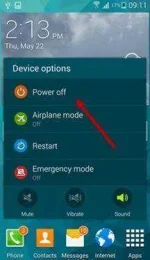
Step 3: Power off your Samsung Galaxy S Duos 2 GT-S7582.
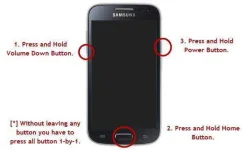
Step 4: Now, you have to enter to Download Mode into your phone by pressing Volume Up, Power Key, and Home Button for 5-8 seconds.
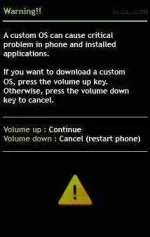
Step 5: In the Download Mode, you need to hit/press the Volume Up key to continue.
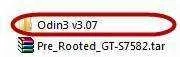
Step 6: Open the Odin3(makikita mo yun sa extracted folder, sa pag dowload sa step2). Then connect your phone to your computer.
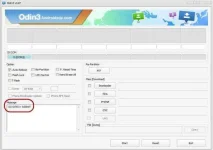
Step 7: Once you have connected it to the computer, Oden automatically recognize the device and meron "Added" na message na mag appear sa buttom-left na box.
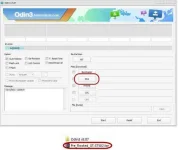
Step 8: Once the device is detected. Click on PDA buttom and select/locate the file Pre_Rooted_GT-S7582.tar file.(extracted na ang file sa step 2.)
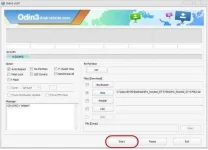
Step 9: Click on "Start" button in oden to begin flashing. Once flashing process complete the device restart automatically .
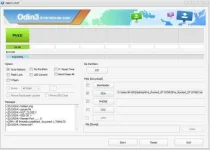
Step 10: If meron kanang nakita na green color na "Pass" Message then remove the usb cable from the device.
Step 11: Verify if the your phone is complete rooted. You can see the SuperSU icon app in your device.
DOne!
You can check if you device is root by installing or verify it by an root checker.
Note:
After rooting, your Samsung now warranty may be void.
Una sa lahat tuturoan ko po kayo magroot sa device niyo,pero exclusive lang to or working lang sa Galaxy S Duos 2 GT-S7582. More information about this device- kindly You do not have permission to view the full content of this post. Log in or register now.
ADVICE:
MORE SAFER TO PRE-ROOT THE FIRMWARE BECAUSE, MANY OF THEM INFORMED THAT KINGO AND VROOT APPS ARE MALWARE! I DON'T KNOW KUNG TOTOO, PERO DAPAT ALERTO TAYO,
AND A WORD OF ADVISE TO YOU ALL PHC members. "DON'T USE VROOT OR KINGO". PERO NASA DESISYON NIYO YAN.
----------------------------------------
How to root Galaxy S Duos 2 GT-S7582 with Pre-Rooted Stock ROM
Ok let's start now.
Requirements: Dapat ang phone mo may battery atleast 30-40% siya para sa rooting process(sa part na sa Download Mode, also need laptop o computer or notebook.
First Step: You do not have permission to view the full content of this post. Log in or register now.and install Samsung USB Driver on your computer. If already installed, skip this process. Proceed to step2.
Step 2: You do not have permission to view the full content of this post. Log in or register now. and extract mo yun root files sa computer. After sa extracting makikita mo ang files files.
Step 3: Power off your Samsung Galaxy S Duos 2 GT-S7582.
Step 4: Now, you have to enter to Download Mode into your phone by pressing Volume Up, Power Key, and Home Button for 5-8 seconds.
Step 5: In the Download Mode, you need to hit/press the Volume Up key to continue.
Step 6: Open the Odin3(makikita mo yun sa extracted folder, sa pag dowload sa step2). Then connect your phone to your computer.
Step 7: Once you have connected it to the computer, Oden automatically recognize the device and meron "Added" na message na mag appear sa buttom-left na box.
Step 8: Once the device is detected. Click on PDA buttom and select/locate the file Pre_Rooted_GT-S7582.tar file.(extracted na ang file sa step 2.)
Step 9: Click on "Start" button in oden to begin flashing. Once flashing process complete the device restart automatically .
Step 10: If meron kanang nakita na green color na "Pass" Message then remove the usb cable from the device.
Step 11: Verify if the your phone is complete rooted. You can see the SuperSU icon app in your device.
DOne!
You can check if you device is root by installing or verify it by an root checker.
Note:
After rooting, your Samsung now warranty may be void.