 PH
PHMarami pa rin ba ang nagtatanong kung paano magkaroon ng professional/business email? If you are thinking of purchasing a domain just to have your own professional or business email, think again! Having your own professional/business email will cost you a few dollars kung hindi mo pa alam ang ibang paraan makakuha ng libre.
The good news is, PortfolioBox offer a free year (will renew if using a .edu email during registration) of their Professional Plan. I have posted a thread before highlighting the benefits of PortfolioBox Professional Plan.
Technically, PortfolioBox is used to showcase your own portfolio and your projects to get clients. But aside from this, you will also get a professional/business email that is based on a domain of your choice.
If you are not a fan of public domain email like GMail, Yahoo, and Outlook, or if you are simply wanting your own email, PortfolioBox is what you need.
I have applied for and got approved for an easy signup page in February and now it's time to share it.
1. Go to this site --> You do not have permission to view the full content of this post. Log in or register now..
2. Click "CREATE A STUDENT ACCOUNT"
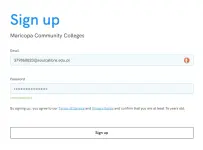
 3. Sign up using an active email address. Kung meron kayong .edu email, much better na gamitin para mag-renew ang plan after 1 year.
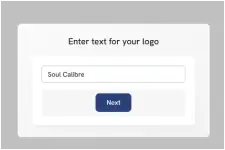
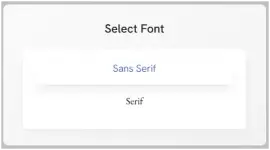
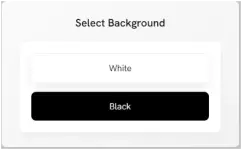
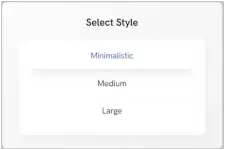
 4. Bahala na kayo kung ano ang ilalagay nyo. Ito ang lalabas sa SEO kung sakaling gagawa kayo ng site or portfolio. Piliin nyo na lang din kung ano ang design structure na gusto nyo.
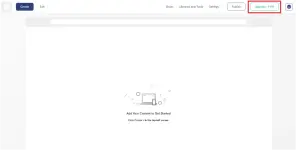
 5. Click "UPGRADE"
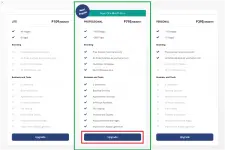
 6. Select "PROFESSIONAL PLAN".
 7. The 100% discount should automatically be applied. Input your name and select country of your preference. Choose either "WeChat Pay" or "Alipay" as a payment method, and click "COMPLETE PAYMENT". Kahit wala kayong WeChat or Alipay, okay lang. Basta pumili na lang kayo sa dalawang yan.
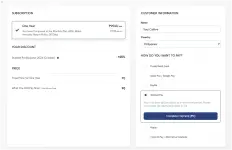 8. This will pop up kahit wala naman talaga kayong inilagay na payment information.
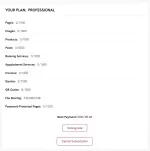
 9. Logout then log back in. Confirm that you are now on a Professional Plan.
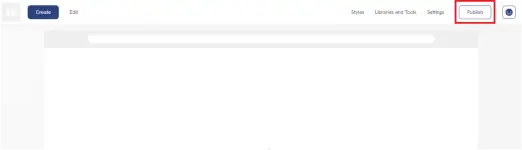
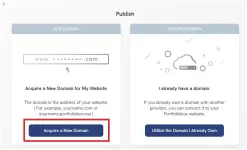
 10. To get your own domain, click "PUBLISH" and select "ACQUIRE A NEW DOMAIN".
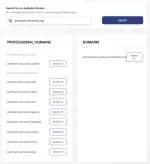
 11. Search for a domain of your choice and see if it's available. Kung available, simply click "SELECT IT" beside the domain. Avoid using brand words sa domain na ire-register nyo para hindi ma-flag for infringement.
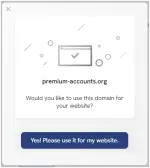
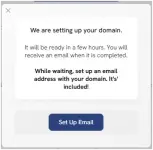
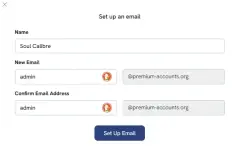
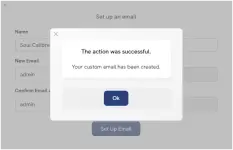
 12. Setup your email. Domain registration might take a few hours, and sometimes may take 24 hours. You may setup email while waiting for the domain to be registered.
 13. Go to your You do not have permission to view the full content of this post.
Log in or register now.. Verify that you have successfully pre-registered your domain. You should see something like this...
13. Go to your You do not have permission to view the full content of this post.
Log in or register now.. Verify that you have successfully pre-registered your domain. You should see something like this...
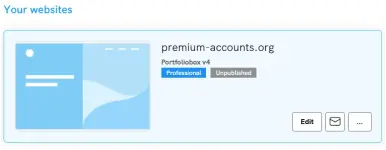 14. Again, it may take a few hours for the domain to be registered and the email to be setup. If you click the mailbox icon, you might see something like this...
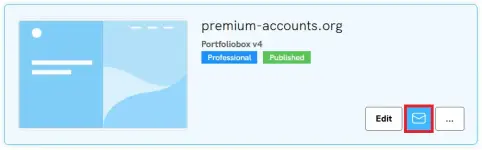
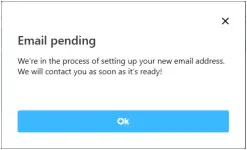 15. Hintayin nyo na lang hanggang sa matapos ang domain registration and email setup. After ma-register ng domain nyo, there are chances na hindi na-setup ang email and needs to be setup. Simply click the 3-dots beside mailbox icon and re-setup your email.
 16. Ganito ang mag-open sa new tab kung na-setup na ang email...

OPTIONAL: After ma-register ng domain nyo, automatic yan na naka-publish. Ganito ang lalabas kapag binisita ang domain nyo...
 Kung gusto nyong i-unpublish, simply open your site from the dashboard, click SETTINGS, then select GENERAL SETTINGS, and scroll down until you see UNPUBLISH YOUR WEBSITE.

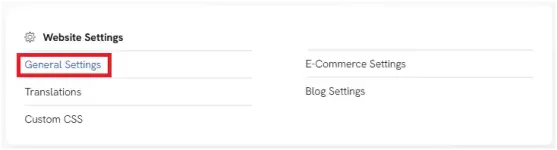
 After ma-unpublish ay ganito na ang lalabas kapag binisita yung domain...

Congrats! May professional/business type email ka na!
For a more detailed information about PortfolioBox, visit my thread:
Feedback na lang sa mga gagawa.
The good news is, PortfolioBox offer a free year (will renew if using a .edu email during registration) of their Professional Plan. I have posted a thread before highlighting the benefits of PortfolioBox Professional Plan.
Technically, PortfolioBox is used to showcase your own portfolio and your projects to get clients. But aside from this, you will also get a professional/business email that is based on a domain of your choice.
If you are not a fan of public domain email like GMail, Yahoo, and Outlook, or if you are simply wanting your own email, PortfolioBox is what you need.
I have applied for and got approved for an easy signup page in February and now it's time to share it.
1. Go to this site --> You do not have permission to view the full content of this post. Log in or register now..
2. Click "CREATE A STUDENT ACCOUNT"
OPTIONAL: After ma-register ng domain nyo, automatic yan na naka-publish. Ganito ang lalabas kapag binisita ang domain nyo...
Congrats! May professional/business type email ka na!
For a more detailed information about PortfolioBox, visit my thread:
How To Get PortfolioBox Pro For Free
Feedback na lang sa mga gagawa.


 Bm ko mona