PH
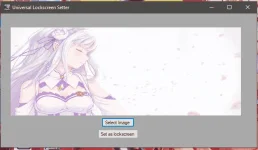
PHItong tutorial na ito ay useful lamang sa mga taong multiple users ang nagamit ng pc at gustong maging uniform ang makikitang lockscreen every time na maglologin kahit na ibang user ang naglogin na huli.
Tutorial
Requirements:
Windows 10 OS
You do not have permission to view the full content of this post. Log in or register now.
Steps:
1. Download batch file from the link above.
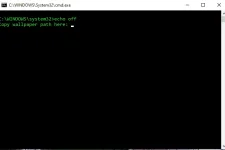
2. Pagkadownload, open nyo yung batch file as administrator. Ganto lalabas sa kanya dapat:
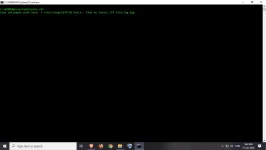
3. Icopy-paste yung path nung image na gusto nyong gawing lockscreen para sa lahat ng user ng pc nyo including the file name and extension ito example:
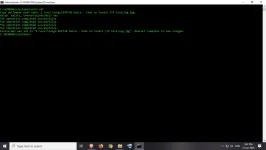
4. Hit enter. Kapag may prompt na value exist na katulad sa pic, type Yes. Kapag wala diretso an yan sa operation completed successfully.
5. Restart your computer. Kapag medyo pumalpak at blue screen lang lockscreen, repeat from step 2 and check na tama ang path+filename with extension gagana rin yan pero minsan after 2 restart o pagkalipas ng ilang segundo after 1st boot ayos na yan.
Tutorial
Requirements:
Windows 10 OS
You do not have permission to view the full content of this post. Log in or register now.
Steps:
1. Download batch file from the link above.
2. Pagkadownload, open nyo yung batch file as administrator. Ganto lalabas sa kanya dapat:
3. Icopy-paste yung path nung image na gusto nyong gawing lockscreen para sa lahat ng user ng pc nyo including the file name and extension ito example:
4. Hit enter. Kapag may prompt na value exist na katulad sa pic, type Yes. Kapag wala diretso an yan sa operation completed successfully.
5. Restart your computer. Kapag medyo pumalpak at blue screen lang lockscreen, repeat from step 2 and check na tama ang path+filename with extension gagana rin yan pero minsan after 2 restart o pagkalipas ng ilang segundo after 1st boot ayos na yan.