 PH
PHblackestsaint
Eternal Poster
Current Supported Protocols:
1. Vmess
2. Vless
3. Trojan
4. Shadowsocks
5. Socks
Note:
Typo in Panel:
Transport: http = h2
Supported Platforms [Client Side]:
1. Windows
2. Andoid Phones
3. iPhones
4. Mac
Supported Distro [Server Side]::
1. CentOS 7+
2. Ubuntu 16+
3. Debian 8+
How to install:
How to Use V2Ray Panel?
1. Go to your browser and enter this link:
You do not have permission to view the full content of this post. Log in or register now.
Note: Change 123.123.123.123 to your VPS IP Address.
Login Username: admin
Login Password: admin
2. Go to Accounts
3. Tap or click the " + " button. its color blue.
4. Add Account Tab will appear and
fill in and choose parameters for your V2Ray.
How to access V2Ray Panel Setting in your VPS:
Screenshots:
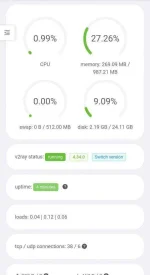
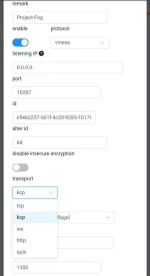
How to install BBR :
Note: im not the author or who make the V2ray Panel.
All credits to Sprov of Github
1. Vmess
2. Vless
3. Trojan
4. Shadowsocks
5. Socks
Note:
Typo in Panel:
Transport: http = h2
Supported Platforms [Client Side]:
1. Windows
2. Andoid Phones
3. iPhones
4. Mac
Supported Distro [Server Side]::
1. CentOS 7+
2. Ubuntu 16+
3. Debian 8+
How to install:
Code:
sudo apt update && sudo apt upgrade -y
sudo apt install curl -y
bash <(curl -Ls https://blog.sprov.xyz/v2-ui.sh)
How to Use V2Ray Panel?
1. Go to your browser and enter this link:
You do not have permission to view the full content of this post. Log in or register now.
Note: Change 123.123.123.123 to your VPS IP Address.
Login Username: admin
Login Password: admin
2. Go to Accounts
3. Tap or click the " + " button. its color blue.
4. Add Account Tab will appear and
fill in and choose parameters for your V2Ray.
How to access V2Ray Panel Setting in your VPS:
Code:
v2-uiScreenshots:
How to install BBR :
Code:
bash <(curl -L -s https://github.com/sprov065/blog/raw/master/bbr.sh)Note: im not the author or who make the V2ray Panel.
All credits to Sprov of Github


 Honesty wala talaga ako alam diyan