 PH
PHSETUP GUIDE:
STEP 1. Install the Stremio app from the You do not have permission to view the full content of this post. Log in or register now. or on your device store.
STEP 2. Create an account.
STEP 3. Then, setup your Stremio account with just a few clicks by bootstrapping a preset into your account.
• Go to You do not have permission to view the full content of this post. Log in or register now.
0. AUTHENTICATE:
Login using your Stremio account.
1. SELECT LANGUAGE:
Defaults to English.
2. ENTER DEBRID API KEY (OPTIONAL):
Leave this Empty.
3. ADDITIONAL ADDONS (OPTIONAL):
Select Anime Kitsu, USA TV and StreamAsia.
4. ADDITIONAL OPTIONS (OPTIONAL):
Check the No 4K if you have a slow internet connection or your device can't handle 4K content.
5. ENTER RPDB KEY (OPTIONAL):
t0-free-rpdb
6. LOAD PRESET:
Click the Load Addons Preset to load your profiles addons.
7. CUSTOMIZE ADDONS (OPTIONAL):
Leave it Untouched or re-order your addons as you like.
8. BOOTSTRAP ACCOUNT:
Click the Sync to Stremio button to sync the changes.
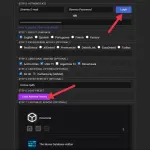
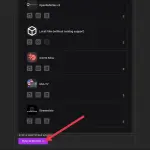
• Note: You will wipe the existing setup. It is recommended to use this on a fresh account to speed up the process of setting up new accounts or one where you want to start with a completely new setup.
STEP 4. Now, we are going to configure and add Nuvio Streams addon that provides direct HTTP streams from websites and it does not use P2P or torrents (OPTIONAL).
• Go to You do not have permission to view the full content of this post. Log in or register now.
1. Customize Your Providers:
Click the Select All and Apply Selection button.
2. Personal Cookie Configuration EXTREMELY RECOMMENDED:
Enter your token or click the How to Get button for more info.
3. Click the Check and Set Cookie or Override & Set button.
4. Click the Copy Manifest button (or Install Addon).
5. Open the Stremio app and Paste the manifest URL into the Search bar.
6. Click Install, and tadaaaaaa!
HOW TO GET SHOWBOX COOKIE USING ANDROID PHONE?
1. Download and install the Kiwi Browser app.
• You do not have permission to view the full content of this post. Log in or register now.
• You do not have permission to view the full content of this post. Log in or register now.
2. Open the Kiwi Browser app and go to You do not have permission to view the full content of this post. Log in or register now.
3. Login to FebBox using your Google account.
4. Click the 3 Dots button at the upper right.
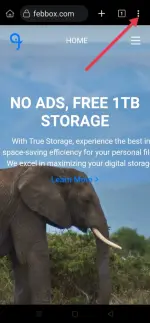
5. Select the Developer tools.
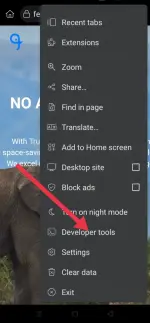
6. Click the 2 Arrows in the right sidebar and select Application tab.
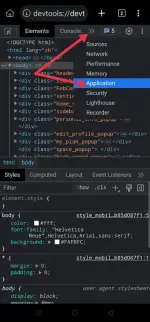
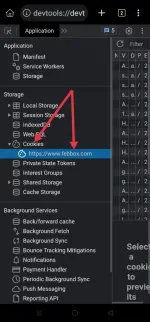
7. Expand or Double Tap the Cookies and select www . febbox . com
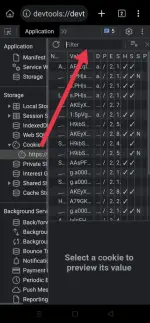
8. Click the Filter bar at upper right.
9. Enter ui ey in the Filter field.
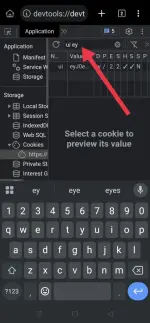
10. Click on the ui name and ey value in the list.
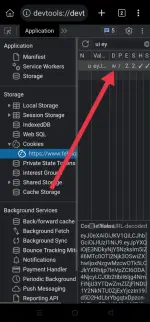
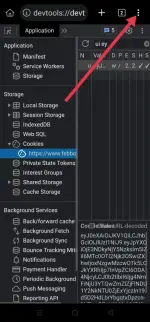
11. Click the 3 Dots button at the upper right.
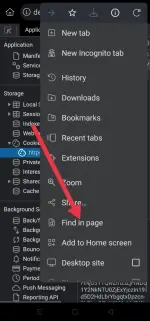
12. Select the Find in page.
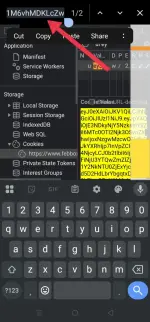
13. Select All or Double Tap the cookie value at the bottom right, usually starts with ey.
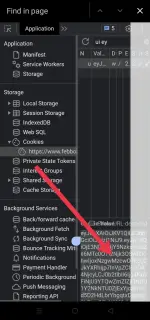
14. Drag and Drop the entire string into the Find in page bar.
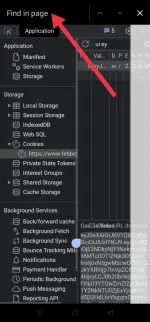
15. Copy the value of this cookie then Paste it into the Personal Cookie Configuration input field.
ADDON MANAGER
• Effortlessly manage the order of your Stremio addons. This means you no longer have to uninstall and reinstall addons to change the order of their catalogues (OPTIONAL).
• Go to You do not have permission to view the full content of this post. Log in or register now.
0. AUTHENTICATE:
Login using your Stremio account.
1. LOAD ADDONS:
Click the Load Addons to load your profiles addons.
2. RE-ORDER ADDONS:
Reorder, Rename and Delete your addons as you like.
3. SYNC ADDONS:
Click the Sync to Stremio button to sync the changes.
• Note: Stremio functionality relies on the existence of certain addons (ie, Cinemeta). It is possible that the order of addons is also important to some functionality. The default lists cannot be removed, but you can push them down. There is currently no way to 'reset' your addons to previous configurations or default configurations.
How to Setup M3U(8) and Xtreme Codes for Stremio
STEP 1. Install the Stremio app from the You do not have permission to view the full content of this post. Log in or register now. or on your device store.
STEP 2. Create an account.
STEP 3. Then, setup your Stremio account with just a few clicks by bootstrapping a preset into your account.
• Go to You do not have permission to view the full content of this post. Log in or register now.
0. AUTHENTICATE:
Login using your Stremio account.
1. SELECT LANGUAGE:
Defaults to English.
2. ENTER DEBRID API KEY (OPTIONAL):
Leave this Empty.
If you pay for a subscription, select your Debrid provider and enter your API key.3. ADDITIONAL ADDONS (OPTIONAL):
Select Anime Kitsu, USA TV and StreamAsia.
4. ADDITIONAL OPTIONS (OPTIONAL):
Check the No 4K if you have a slow internet connection or your device can't handle 4K content.
5. ENTER RPDB KEY (OPTIONAL):
t0-free-rpdb
6. LOAD PRESET:
Click the Load Addons Preset to load your profiles addons.
7. CUSTOMIZE ADDONS (OPTIONAL):
Leave it Untouched or re-order your addons as you like.
8. BOOTSTRAP ACCOUNT:
Click the Sync to Stremio button to sync the changes.
• Note: You will wipe the existing setup. It is recommended to use this on a fresh account to speed up the process of setting up new accounts or one where you want to start with a completely new setup.
STEP 4. Now, we are going to configure and add Nuvio Streams addon that provides direct HTTP streams from websites and it does not use P2P or torrents (OPTIONAL).
• Go to You do not have permission to view the full content of this post. Log in or register now.
1. Customize Your Providers:
Click the Select All and Apply Selection button.
2. Personal Cookie Configuration EXTREMELY RECOMMENDED:
Enter your token or click the How to Get button for more info.
How to get ShowBox cookie using Android phone? Please refer below.3. Click the Check and Set Cookie or Override & Set button.
4. Click the Copy Manifest button (or Install Addon).
5. Open the Stremio app and Paste the manifest URL into the Search bar.
6. Click Install, and tadaaaaaa!
HOW TO GET SHOWBOX COOKIE USING ANDROID PHONE?
1. Download and install the Kiwi Browser app.
• You do not have permission to view the full content of this post. Log in or register now.
• You do not have permission to view the full content of this post. Log in or register now.
2. Open the Kiwi Browser app and go to You do not have permission to view the full content of this post. Log in or register now.
3. Login to FebBox using your Google account.
4. Click the 3 Dots button at the upper right.
5. Select the Developer tools.
6. Click the 2 Arrows in the right sidebar and select Application tab.
7. Expand or Double Tap the Cookies and select www . febbox . com
8. Click the Filter bar at upper right.
9. Enter ui ey in the Filter field.
10. Click on the ui name and ey value in the list.
11. Click the 3 Dots button at the upper right.
12. Select the Find in page.
13. Select All or Double Tap the cookie value at the bottom right, usually starts with ey.
14. Drag and Drop the entire string into the Find in page bar.
15. Copy the value of this cookie then Paste it into the Personal Cookie Configuration input field.
ADDON MANAGER
• Effortlessly manage the order of your Stremio addons. This means you no longer have to uninstall and reinstall addons to change the order of their catalogues (OPTIONAL).
• Go to You do not have permission to view the full content of this post. Log in or register now.
0. AUTHENTICATE:
Login using your Stremio account.
1. LOAD ADDONS:
Click the Load Addons to load your profiles addons.
2. RE-ORDER ADDONS:
Reorder, Rename and Delete your addons as you like.
3. SYNC ADDONS:
Click the Sync to Stremio button to sync the changes.
• Note: Stremio functionality relies on the existence of certain addons (ie, Cinemeta). It is possible that the order of addons is also important to some functionality. The default lists cannot be removed, but you can push them down. There is currently no way to 'reset' your addons to previous configurations or default configurations.
How to Setup M3U(8) and Xtreme Codes for Stremio