 PH
PHPHC_Incognito
Forum Veteran
Share your Internet Connections from PISOWIFI to PC/ LAPTOP
Prerequisite:
Pdanet app for android : You do not have permission to view the full content of this post. Log in or register now.
Pdanet App for PC: You do not have permission to view the full content of this post. Log in or register now.
Instructions:
1.After installing the softwares,
In your android device, enable the USB DEBUGGING Mode ( Nasa settings, developer options) depende sa model ng phone..
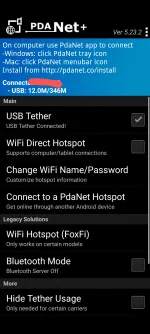
2. Connect your phone via USB to PC, open the pdanet app ( Follow nyo lang ang promp).
3. Connect and enjoy


Prerequisite:
Pdanet app for android : You do not have permission to view the full content of this post. Log in or register now.
Pdanet App for PC: You do not have permission to view the full content of this post. Log in or register now.
Instructions:
1.After installing the softwares,
In your android device, enable the USB DEBUGGING Mode ( Nasa settings, developer options) depende sa model ng phone..
2. Connect your phone via USB to PC, open the pdanet app ( Follow nyo lang ang promp).
3. Connect and enjoy