PH
PH
Note: this post contains third party software/tools, although tried and tested ko mismo ang isheshare ko sa baba, still, use it at your own risk.
Note: this post contains third party software/tools, although tried and tested ko mismo ang isheshare ko sa baba, still, use it at your own risk.
Pabilisin natin ang windows PC/Laptop mo
Debloat Windows | Reduce Windows Animations And Cleaning your storage | Using a Third Party Software | Optional
Debloat Windows
warning: this debloat script may clear your browser's saved auto fill data, cookies, cache etc, please be advised
warning: this debloat script may clear your browser's saved auto fill data, cookies, cache etc, please be advised
For debloating windows, credits muna kay ChrisTitusTech, sa youtube po sya mahahanap
link ng github nung pang debloat: You do not have permission to view the full content of this post. Log in or register now.
dropmb download link: You do not have permission to view the full content of this post. Log in or register now.
tinignan ko po ang source code ito ang makikita kapag click ang essential tweaks

tinignan ko ang laman or code nung essential tweaks na button and ito ang code or ginagawa niya
link ng github nung pang debloat: You do not have permission to view the full content of this post. Log in or register now.
dropmb download link: You do not have permission to view the full content of this post. Log in or register now.
tinignan ko po ang source code ito ang makikita kapag click ang essential tweaks
tinignan ko ang laman or code nung essential tweaks na button and ito ang code or ginagawa niya
Code:
Disabling Telemetry...[/COLOR][/CENTER][/COLOR][/CENTER][/COLOR][/CENTER][/COLOR][/CENTER][/COLOR][/CENTER][/COLOR][/CENTER][/COLOR][/CENTER][/COLOR][/CENTER][/COLOR][/CENTER][/COLOR][/CENTER][/COLOR][/CENTER][/COLOR][/CENTER][/COLOR][/CENTER][/COLOR][/CENTER][/COLOR][/CENTER][/COLOR][/CENTER][/COLOR][/CENTER][/COLOR][/CENTER][/COLOR][/CENTER][/COLOR][/CENTER][/COLOR][/CENTER][/COLOR][/CENTER][/COLOR][/CENTER][/COLOR][/CENTER][/COLOR][/CENTER][/COLOR][/CENTER][/COLOR][/CENTER]
[COLOR=rgb(97, 189, 109)][CENTER][COLOR=rgb(97, 189, 109)][CENTER][COLOR=rgb(97, 189, 109)][CENTER][COLOR=rgb(97, 189, 109)][CENTER][COLOR=rgb(97, 189, 109)][CENTER][COLOR=rgb(97, 189, 109)][CENTER][COLOR=rgb(97, 189, 109)][CENTER][COLOR=rgb(97, 189, 109)][CENTER][COLOR=rgb(97, 189, 109)][CENTER][COLOR=rgb(97, 189, 109)][CENTER][COLOR=rgb(97, 189, 109)][CENTER][COLOR=rgb(97, 189, 109)][CENTER][COLOR=rgb(97, 189, 109)][CENTER][COLOR=rgb(97, 189, 109)][CENTER][COLOR=rgb(97, 189, 109)][CENTER][COLOR=rgb(97, 189, 109)][CENTER][COLOR=rgb(97, 189, 109)][CENTER][COLOR=rgb(97, 189, 109)][CENTER][COLOR=rgb(97, 189, 109)][CENTER][COLOR=rgb(97, 189, 109)][CENTER][COLOR=rgb(97, 189, 109)][CENTER][COLOR=rgb(97, 189, 109)][CENTER][COLOR=rgb(97, 189, 109)][CENTER][COLOR=rgb(97, 189, 109)][CENTER][COLOR=rgb(97, 189, 109)][CENTER][COLOR=rgb(97, 189, 109)][CENTER][COLOR=rgb(97, 189, 109)][CENTER]Disabling Application suggestions...
Stopping and disabling Diagnostics Tracking Service...
Stopping and disabling WAP Push Service...
Stopping and disabling Home Groups services...
Disabling Remote Assistance...
Disabling Storage Sense...
Stopping and disabling Superfetch service...
Disabling Hibernation...
Hiding Task View button...
Hiding People icon...
Showing all tray icons...
Enabling NumLock after startup...
Changing default Explorer view to This PC...
Hiding 3D Objects icon from This PC...

mareremove na apps

#Unnecessary Windows 10 AppX Apps
        "Microsoft.3DBuilder"
        "Microsoft.AppConnector"
        "Microsoft.BingFinance"
        "Microsoft.BingNews"
        "Microsoft.BingSports"
        "Microsoft.BingTranslator"
        "Microsoft.BingWeather"
        "Microsoft.GetHelp"
        "Microsoft.Getstarted"
        "Microsoft.Messaging"
        "Microsoft.Microsoft3DViewer"
        "Microsoft.MicrosoftSolitaireCollection"
        "Microsoft.NetworkSpeedTest"
        "Microsoft.News"
        "Microsoft.Office.Lens"
        "Microsoft.Office.Sway"
        "Microsoft.OneConnect"
        "Microsoft.People"
        "Microsoft.Print3D"
        "Microsoft.SkypeApp"
        "Microsoft.StorePurchaseApp"
        "Microsoft.Wallet"
        "Microsoft.Whiteboard"
        "Microsoft.WindowsAlarms"
        "microsoft.windowscommunicationsapps"
        "Microsoft.WindowsFeedbackHub"
        "Microsoft.WindowsMaps"
        "Microsoft.WindowsSoundRecorder"
        "Microsoft.ZuneMusic"
        "Microsoft.ZuneVideo"

        #Sponsored Windows 10 AppX Apps
        #Add sponsored/featured apps to remove in the "[I]AppName[/I]" format
        "[I]EclipseManager[/I]"
        "[I]ActiproSoftwareLLC[/I]"
        "[I]AdobeSystemsIncorporated.AdobePhotoshopExpress[/I]"
        "[I]Duolingo-LearnLanguagesforFree[/I]"
        "[I]PandoraMediaInc[/I]"
        "[I]CandyCrush[/I]"
        "[I]BubbleWitch3Saga[/I]"
        "[I]Wunderlist[/I]"
        "[I]Flipboard[/I]"
        "[I]Twitter[/I]"
        "[I]Facebook[/I]"
        "[I]Royal Revolt[/I]"
        "[I]Sway[/I]"
        "[I]Speed Test[/I]"
        "[I]Dolby[/I]"
        "[I]Viber[/I]"
        "[I]ACGMediaPlayer[/I]"
        "[I]Nétflí×[/I]"
        "[I]OneCalendar[/I]"
        "[I]LinkedInforWindows[/I]"
        "[I]HiddenCityMysteryofShadows[/I]"
        "[I]Hulu[/I]"
        "[I]HiddenCity[/I]"
        "[I]AdobePhotoshopExpress[/I]"

        #Optional: Typically not removed but you can if you need to for some reason
        #"[I]Microsoft.Advertising.Xaml_10.1712.5.0_x64__8wekyb3d8bbwe[/I]"
        #"[I]Microsoft.Advertising.Xaml_10.1712.5.0_x86__8wekyb3d8bbwe[/I]"
        #"[I]Microsoft.BingWeather[/I]"
        #"[I]Microsoft.MSPaint[/I]"
        #"[I]Microsoft.MicrosoftStickyNotes[/I]"
        #"[I]Microsoft.Windows.Photos[/I]"
        #"[I]Microsoft.WindowsCalculator[/I]"
#"[I]Microsoft.WindowsStore[/I]"yung button lang po na essential tweaks ang pipindutin
pagnadownload niyo po yung file ito ang laman niya
yung win10debloat.ps1 ang pipindutin
right click tapos run with powershell po
==
kung gusto mo po ma disable ang windows defender yung low po ang pipindutin niyo
low po na button sa may security
familiar ba kayo sa windows restore point? gagawan niya po yun then pwede mo po marestore if ayaw niyo po nung ginawa nung debloat program
ito po kasi nakalagay sa program para ma balik niyo sa dati if ayaw niyo nung debloat na ginawa niya
last step is to restart
last step is to restart
Reduce Windows Animations And Cleaning your storage
This will help your system gets more responsive/snappier especially when closing and opening application, punta kayo ng control panel then navigate sa system or type this sa URL ng control panel
Control Panel\All Control Panel Items\System

para mapunta kayo dito
Control Panel\All Control Panel Items\System
para mapunta kayo dito
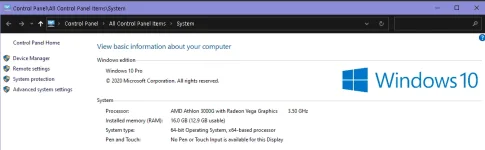
then click advanced system settings then click performance
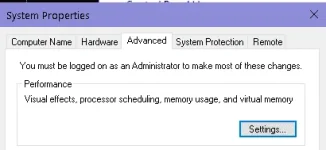
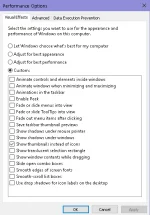
then you can just uncheck all, pero sakin may isang naka check lang
pangalawa, nirun ko tong registry na ito
dropmb: You do not have permission to view the full content of this post. Log in or register now.
tapos run mo lang po ito
last step is to restart
Clean your storage
mga hindi mo na ginagamit na files and applications/software learn to let go din po, bura bura din pag may time and the uninstall ng mga hindi kaylangan sa buhay hahaha, kidding aside, mas lalaki pa storage mo
Using a Third Party Software
credits sa isang user dito from another thread, na nag suggest ng third party thread and effective naman so far
[ Ace7eves ] https://phcorner.org/threads/90-memory-usage.1023879/
ayon sa Thread Starter nung thread na yon ( Uzumaki-Naruto ), effective and legit, also tried it to my pc, legit din po siya, disabled startup items, cleans unnecessary things

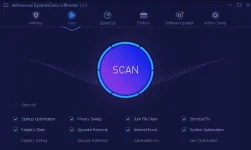
the software is called Advance System Care
nahiwalay siya sa drop mb because of 100mb limitation kaya need mo download both, then extract mo yung part 1 na rar file and need ng dalawang file na nasa iisang folder lang
drop mb: You do not have permission to view the full content of this post. Log in or register now.
after extracting, may instructions naman for the license and all
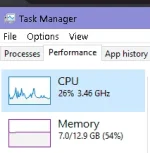
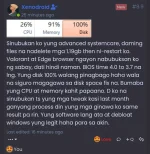
after that bumaba na ang aking cpu usage
[ Ace7eves ] https://phcorner.org/threads/90-memory-usage.1023879/
ayon sa Thread Starter nung thread na yon ( Uzumaki-Naruto ), effective and legit, also tried it to my pc, legit din po siya, disabled startup items, cleans unnecessary things
the software is called Advance System Care
nahiwalay siya sa drop mb because of 100mb limitation kaya need mo download both, then extract mo yung part 1 na rar file and need ng dalawang file na nasa iisang folder lang
drop mb: You do not have permission to view the full content of this post. Log in or register now.
after extracting, may instructions naman for the license and all
after that bumaba na ang aking cpu usage
Optional --You may not need to do these optional things--
When your disk always or most of the time at 100%

First thing you wanna try is to disable superfetch
ano ang superfetch?
tinutukoy ng superfetch ang mga software na madalas mong gamitin, at sisiguraduhin niya na next time na pag open mo dun sa app/software na yon ay mas mabilis na or mas efficient pero kadalasan tong issue ng 100% disk usage
to disable, open a command prompt as admin
then type
Code:
net.exe stop superfetchif it does not work, enter this command instead
Code:
net.exe stop sysmainSecond step you need to do, is to go to your power options
search for high power options or performance or basta click mo yung change plan settings sa kahit alin sa available na options na nakalagay sa pc mo
make sure na naka 100% lahat ng nandito
then next step, the magical restart
[to enable superfetch again if superfetch does not work for you]
Code:
sc config “SysMain” start=auto & sc start “SysMain”
Lastly, keeping your windows up to date is also recommended, lalo na kung ang lahat ng drivers mo ay default palang or 'generic' drivers pa lang, it also helps with reducing lag or other issue you are encountering lalo na if maupdate mo ang graphics drivers mo.
Lastly, keeping your windows up to date is also recommended, lalo na kung ang lahat ng drivers mo ay default palang or 'generic' drivers pa lang, it also helps with reducing lag or other issue you are encountering lalo na if maupdate mo ang graphics drivers mo.
The next thing dito sa optional is to upgrade your hardware
upgrade to ssd (as suggested by Benman1010 )The next thing dito sa optional is to upgrade your hardware
much recommended as the ssd is much superior than the harddrive in terms of speed and durability since ssd is a flash storage and no moving parts unlike an hdd which has a spinning disk inside, once yoou go ssd, you will never go back to hdd
and also, upgrade your ram to a much higher capacity and much higher frequency and mas lower laterncy (CL; CAS Latency) given na supported ng system niyo (motherboard etc)
*****the following are from our fellow phcorner users, I do not take credit for their input/contributions so use/or do it at your own risk lalo na pag install ng mga software/tools*****
again, softwares/tools below ay hindi ko na mismo na try or na test
again, softwares/tools below ay hindi ko na mismo na try or na test
it is up to you if you want to disable windows update but be careful, may mga windows update na important like patches for security from viruses, ransomwares, malwares etc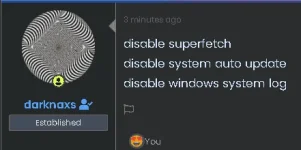
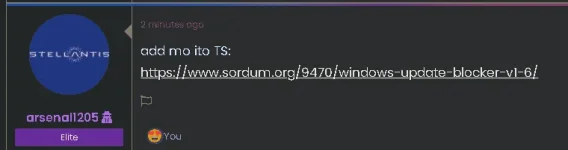
use it at your own risk too, thank you!
Drop mb link: You do not have permission to view the full content of this post. Log in or register now.
From fuzzywubby
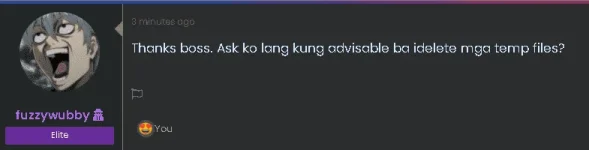
Yes po, safe po idelete and temp files
windows R > type 'temp"
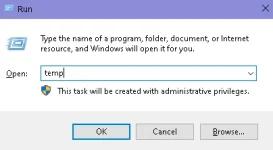
then delete all temp files
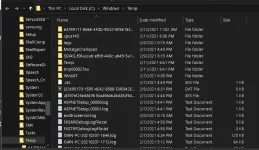
after that meron pa from other location
again windows R > type '%temp%'
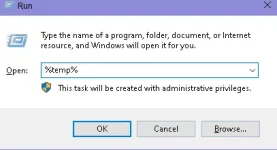
then delete all files
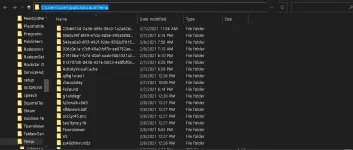
what are temp files? (temporary files)
Temporary files are usually referred to those files that apps store on your computer to hold information temporarily. However, Windows 10 has many other temporary file types, including those leftover files after installing a new version, upgrade logs, error reporting, temporary Windows installation files, and more.
From Xenodroid

He has and advise to only click or hse the recommended settings
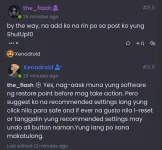
talk to xenodroid if you have any questions about this software po [pano gamitin, mag-navigate sa software, etc]
You do not have permission to view the full content of this post. Log in or register now.
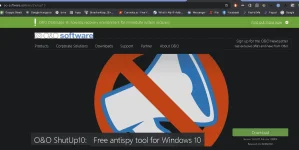
As per xenodroid, this is an alternative third party debloat software Called ShutUp10 by O&O
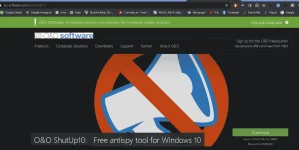

===
Feedback:

sorry kung multi-colored yung post hehe
Follow me for updates to my future posts and feedback naman po sana, gusto ko lang malaman kung nakatulong ba sainyo kahit papaano or hindi
other posts/threads:
Make your own VIP iF-lix Account [tut]https://phcorner.org/forums/freemium-accounts.261/post-thread
https://phcorner.org/threads/make-your-own-vip-if-lix-account-tut.1031389/
I have something important to tell you!
https://phcorner.org/threads/i-have-something-important-to-tell-you.1028744/
Windows Activation [tut]
https://phcorner.org/threads/windows-activation-tut.1023299/
Random Ebooks
https://phcorner.org/threads/random-ebooks.1020644/
Goodboy (Short Story)
https://phcorner.org/threads/goodboy-short-story.1033792/
Parang password?
https://phcorner.org/threads/parang-password.1033354/
Bakit nga ba ganun?
https://phcorner.org/threads/bakit-nga-ba-ganun.1033063/
Last Updated: Sunday | February 21, 2021 | 04:29 PM