 PH
PH
Full-featured reader
Discover and read manga, webtoons, comics, and more—easier than ever on your Android device.
Mihon is an app that allows you to read any manga or comic from your Android device. All you have to do is choose your favorite sources from more than a hundred different web pages. You can add as many sources and repositories as you like, searching for content in each of these portals separately.
This post is a tutorial on how to use this APP. Check out my thread about this APP here at.
Manga, Webtoons, Comics Reader App
HOW TO USE
Step 1. After installing mihon, go to settings. | 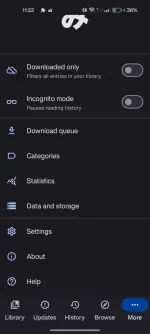 |
Step 2. In settings, select the "BROWSE" option. | 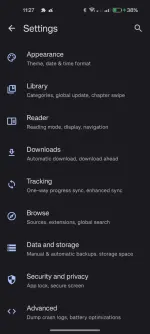 |
Step 3. In the BROWSE option you will see the Extension repos; TAP it. | 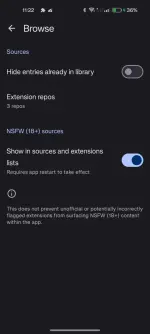 |
Step 4. Now, paste the repository link I provided here. You do not have permission to view the full content of this post. Log in or register now. | 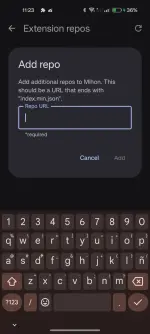 |
Step 5. Once you add the link to the Extension Repository, the Extension Tab should now display the Extension List. | 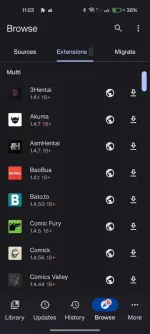 |
Step 6. Once you install the Extension that you need, you can now go to the Source tab and search for the Manhwa/Manga that you would like to read. | 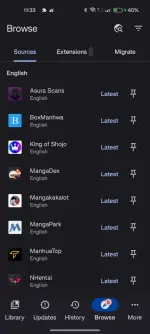 |
Step 7. As you can see, the manhwa I searched showed up from the extensions that I've installed on. | 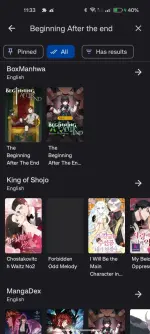 |
Step 8. Now you can either download it to read offline or just read it online. |  |
Step 9. Remember always add the manwha to your library so you wont need to search it up next time. | 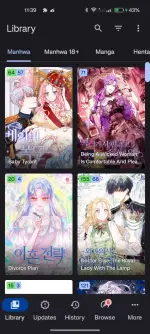 |
There you go; you may now enjoy reading your favorite manhwa/manga.
Happy Reading
