PH
PHArissa ofuma
Contributor
Microsoft Office Professional Plus 2021 Installation Guide
It is important to note that the key you have acquired is a prepaid code that does not work with the pre-installed software. This product is an authentic Microsoft offering.
Please ensure that you un-install any existing version of Microsoft Office from your computer and restart the device. This step is crucial to prevent any compatibility issues.
Download the program with the following download link
| LANGUAGE | 64 BITS | 32 Bits |
| DEUTSCH | You do not have permission to view the full content of this post. Log in or register now. | You do not have permission to view the full content of this post. Log in or register now. |
| ENGLISH | You do not have permission to view the full content of this post. Log in or register now. | You do not have permission to view the full content of this post. Log in or register now. |
| FRANÇAIS | You do not have permission to view the full content of this post. Log in or register now. | You do not have permission to view the full content of this post. Log in or register now. |
| ITALIANO | You do not have permission to view the full content of this post. Log in or register now. | You do not have permission to view the full content of this post. Log in or register now. |
| ESPAÑOL | You do not have permission to view the full content of this post. Log in or register now. | You do not have permission to view the full content of this post. Log in or register now. |
| NEDERLANDS | You do not have permission to view the full content of this post. Log in or register now. | |
| SVENSKA | You do not have permission to view the full content of this post. Log in or register now. |
This EXE file is the basis for the installation of the product.
Upon completion of the download, please proceed with the following steps:
1. Right-click on the file and select the option "Run as administrator."
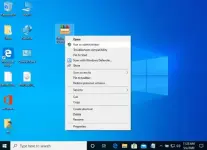
2. Select the “Install” button. This operation will extract the application and proceed with the installation of your product.
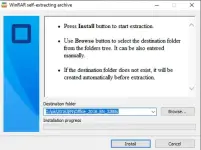
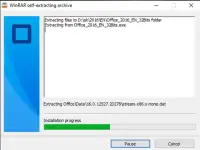
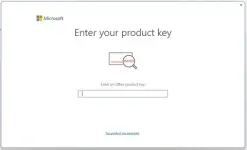
Upon completion of the download and installation of the program, you will be prompted to enter the activation key when launching any application from the Microsoft Office suite; this will be the initial request you encounter.
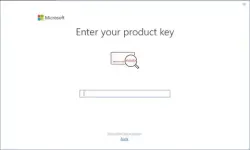
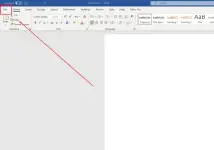
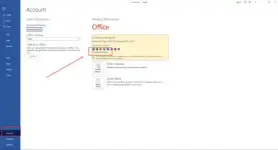
During the installation of Microsoft Office, you should have received a prompt to input the product key that we provided. If this prompt did not appear, please open Word, navigate to the File menu, select Account, and enter the key in the designated area. Failure to do so will result in your purchased Microsoft Office converting to a trial version after 30 days.