 PH
PHuploader74
Forum Veteran
Microsoft says MS Office 2019 is supported on Windows 10 only, and not later versions.
But I would like to share to you how to make it work in Windows 7 2GB RAM (with 30mbps Internet speed)
Microsoft Office 2019 Professional Plus (32-bit / 64-bit) - This version can be installed in Windows 7 Ultimate while Anti Virus is OFF. This version is 1908 Build 11929.20376 (Microsoft Office 2019 Pro Plus Retail October 2019) and has the "Morph" Transition effect in Powerpoint. No need for serial key. My steps will permanently activate it.
Download in 5 parts - File size is 3.27GB as IMG
You do not have permission to view the full content of this post. Log in or register now. * You do not have permission to view the full content of this post. Log in or register now. * You do not have permission to view the full content of this post. Log in or register now. * You do not have permission to view the full content of this post. Log in or register now. * You do not have permission to view the full content of this post. Log in or register now.
(use You do not have permission to view the full content of this post. Log in or register now. to extract the parts)
REMINDER in DOWNLOADING: (with Nørd VPN, NO ADS will show up)
When you clicked Download. Be patient.
Step 1: Below, wait for the timer 10 to 20 seconds.
Step 2: Select I am not a robot.
Step 3: Create download link.
Step 4: You turn to the download page.
MIRROR LINKS:
You do not have permission to view the full content of this post. Log in or register now. * You do not have permission to view the full content of this post. Log in or register now. * You do not have permission to view the full content of this post. Log in or register now. * You do not have permission to view the full content of this post. Log in or register now. * You do not have permission to view the full content of this post. Log in or register now. * You do not have permission to view the full content of this post. Log in or register now. * You do not have permission to view the full content of this post. Log in or register now.
* * * * *
Installation Plus Activation: (make sure Anti Virus is OFF)
01. Extract the 5 parts via You do not have permission to view the full content of this post. Log in or register now.then see the IMG file as "MSOffice 2019 Pro Plus v.1908.11929.20376 Oct 2019.img"
02. Open the IMG file by Extracting it using You do not have permission to view the full content of this post. Log in or register now.
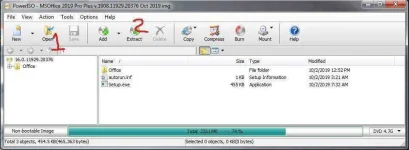
03. Extract it in a new Folder Directory.
04. Download and extract You do not have permission to view the full content of this post. Log in or register now.
05. Launch OInstallLite.exe. and see the Main Screen as below.
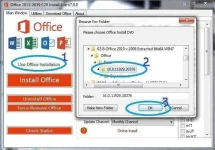
At the main screen, CLICK on "Use Offline Installation" button.
Then, select the folder where you have the installer files extracted. In my case, I selected the folder called 16.0.11929.20376. Then Press OK.
Continue selecting the 2019 Office Pro Plus version. You can check which apps you want to install. If you prefer to discard one, just uncheck it from the list.
Select if you want to install x86 or x64 binaries. In Update channel, choose “Monthly Channel“.
Now, it’s time to click on “Install Office“. Click on Yes when the message related to KMS Service appears. We are installing Retail version, so we won’t need to connect to a KMS Server.
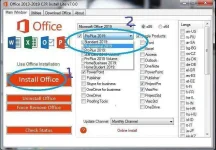
Make sure you are online when you click "Install Office" button.
Deployment process should start in the background as you see the screen below.
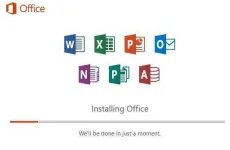
This may take 15min or more, depending how fast your Internet and how many options you selected to install.
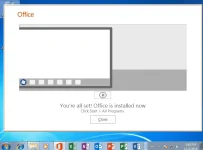
Once you see that last Window, activate Office 2019 Pro Plus.
06. Download and extract You do not have permission to view the full content of this post. Log in or register now.
07. Launch "KMSoffline.exe".
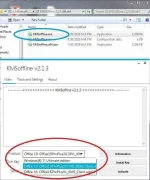
08. On the drop down list, Select "Office 19, OfficeProPlus2019..." (see encircled part).
09. Click Activate, and you are done!
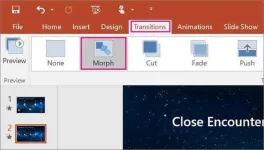
10. Open Powerpoint 2019 and see the "Morp".
Hope this works for you.
Keep Safe, stay home and keep reading phcorner.org!
Pls press LIKE button -
God bless ya all.
But I would like to share to you how to make it work in Windows 7 2GB RAM (with 30mbps Internet speed)
Microsoft Office 2019 Professional Plus (32-bit / 64-bit) - This version can be installed in Windows 7 Ultimate while Anti Virus is OFF. This version is 1908 Build 11929.20376 (Microsoft Office 2019 Pro Plus Retail October 2019) and has the "Morph" Transition effect in Powerpoint. No need for serial key. My steps will permanently activate it.
Download in 5 parts - File size is 3.27GB as IMG
You do not have permission to view the full content of this post. Log in or register now. * You do not have permission to view the full content of this post. Log in or register now. * You do not have permission to view the full content of this post. Log in or register now. * You do not have permission to view the full content of this post. Log in or register now. * You do not have permission to view the full content of this post. Log in or register now.
(use You do not have permission to view the full content of this post. Log in or register now. to extract the parts)
REMINDER in DOWNLOADING: (with Nørd VPN, NO ADS will show up)
When you clicked Download. Be patient.
Step 1: Below, wait for the timer 10 to 20 seconds.
Step 2: Select I am not a robot.
Step 3: Create download link.
Step 4: You turn to the download page.
MIRROR LINKS:
You do not have permission to view the full content of this post. Log in or register now. * You do not have permission to view the full content of this post. Log in or register now. * You do not have permission to view the full content of this post. Log in or register now. * You do not have permission to view the full content of this post. Log in or register now. * You do not have permission to view the full content of this post. Log in or register now. * You do not have permission to view the full content of this post. Log in or register now. * You do not have permission to view the full content of this post. Log in or register now.
* * * * *
Installation Plus Activation: (make sure Anti Virus is OFF)
01. Extract the 5 parts via You do not have permission to view the full content of this post. Log in or register now.then see the IMG file as "MSOffice 2019 Pro Plus v.1908.11929.20376 Oct 2019.img"
02. Open the IMG file by Extracting it using You do not have permission to view the full content of this post. Log in or register now.
03. Extract it in a new Folder Directory.
04. Download and extract You do not have permission to view the full content of this post. Log in or register now.
05. Launch OInstallLite.exe. and see the Main Screen as below.
At the main screen, CLICK on "Use Offline Installation" button.
Then, select the folder where you have the installer files extracted. In my case, I selected the folder called 16.0.11929.20376. Then Press OK.
Continue selecting the 2019 Office Pro Plus version. You can check which apps you want to install. If you prefer to discard one, just uncheck it from the list.
Select if you want to install x86 or x64 binaries. In Update channel, choose “Monthly Channel“.
Now, it’s time to click on “Install Office“. Click on Yes when the message related to KMS Service appears. We are installing Retail version, so we won’t need to connect to a KMS Server.
Make sure you are online when you click "Install Office" button.
Deployment process should start in the background as you see the screen below.
This may take 15min or more, depending how fast your Internet and how many options you selected to install.
Once you see that last Window, activate Office 2019 Pro Plus.
06. Download and extract You do not have permission to view the full content of this post. Log in or register now.
07. Launch "KMSoffline.exe".
08. On the drop down list, Select "Office 19, OfficeProPlus2019..." (see encircled part).
09. Click Activate, and you are done!
10. Open Powerpoint 2019 and see the "Morp".
Hope this works for you.
Keep Safe, stay home and keep reading phcorner.org!
Pls press LIKE button -
God bless ya all.
