 PH
PHThis guide is for my previous thread
https://phcorner.org/threads/best-apps-for-manga-manhwa-manhua-readers-ios-and-android.2108042/
Tutorial: How to Add extension Repo's
Mihon and TachiyomSY
1. Copy this link:
You do not have permission to view the full content of this post. Log in or register now.
2. Open your Mihon or TachiyomSY app
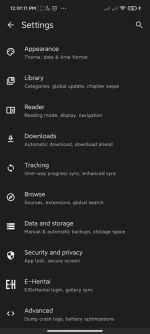
3. Go to Settings, just follow this directory: More>Settings>Browse>Extension Repos
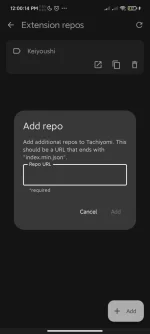
4. Click add button and then paste the link.
For Aidoku
1. Just go to this link: You do not have permission to view the full content of this post. Log in or register now.
2.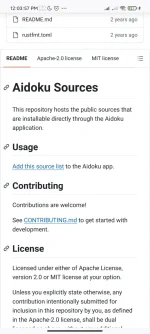
And then just click the add source list and it will automatically add the repo by redirecting you on the Aidoku app.
For Paperback
1. Go to this link: You do not have permission to view the full content of this post. Log in or register now.
2. And then Click add to Paperback

https://phcorner.org/threads/best-apps-for-manga-manhwa-manhua-readers-ios-and-android.2108042/
Tutorial: How to Add extension Repo's
Mihon and TachiyomSY
1. Copy this link:
You do not have permission to view the full content of this post. Log in or register now.
2. Open your Mihon or TachiyomSY app
3. Go to Settings, just follow this directory: More>Settings>Browse>Extension Repos
4. Click add button and then paste the link.
For Aidoku
1. Just go to this link: You do not have permission to view the full content of this post. Log in or register now.
2.
And then just click the add source list and it will automatically add the repo by redirecting you on the Aidoku app.
For Paperback
1. Go to this link: You do not have permission to view the full content of this post. Log in or register now.
2. And then Click add to Paperback