👨‍🏫 Tutorial How to use netflix/prime cøøkíés using pc | Paano gamitin ang netflix/prime cøøkíés gamit ang pc

Veraix

Elite

So heto na ang STEP by STEP Tutorial kung paano mag import ng netflix cookies or kaya prime cookies sa inyong mga pc gamit ang cookie editor so let's start by step 1 to step 13

sa mga nagtatanong kung paano rin sa prime video cookies is same procedure lang po yan bastat pumunta lang kayo sa prime website then gayahin nyo lamang ang instructions sa baba kung papano ito i-import sa cookie editor yun lamang po salamat!


Step 1: Open chrome then click the 3 dots on the top right section
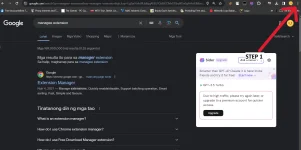
1.png

Step 2: Click extensions then step 3 click visit chrome web store
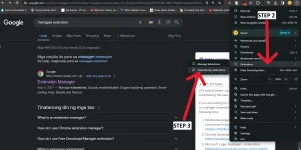
2.png

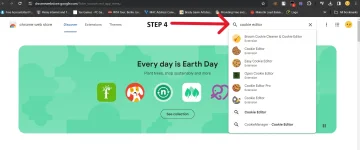
Step 4: Search cookie editor

3.png

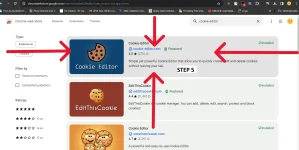
Step 5: Click this one

4.png


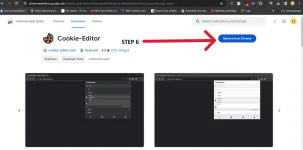
Step 6: Click install 5.png


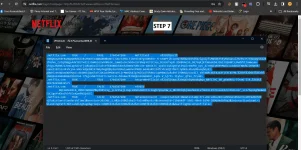
Step 7: Copy your netflix cookies​

6.png

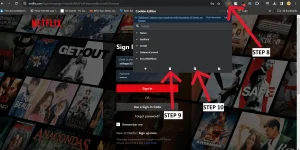
Step 8: Click the cookie editor if walang cookie editor sa taas click nyo lang yung extensions andun yun hindi naka pin step 9 click the delete icon step 10 click the import icon then proceed to the next step7.png

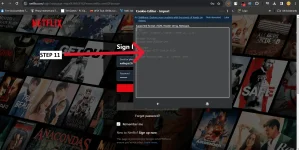
Step 11: Ctrl+V to paste the copied cookies8.png

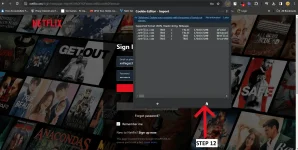
Step 12: Click import9.png

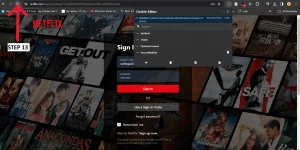
Step 13: Click refresh the page10.png

AND TADA YOU ARE DONE!

11.png

ENJOY WATCHING!!​


About this Thread

  • 73
    Replies
  • 4K
    Views
  • 63
    Participants
Last reply from:
yobim

Trending Topics

Online now

Members online
494
Guests online
1,724
Total visitors
2,218

Forum statistics

Threads
2,315,369
Posts
29,182,234
Members
1,183,553
Latest member
kamy
Back
Top