 PH
PHRequirements:
 Your preferred browser ( Chrome, Firefox, CrytoTab, etc... ) Cookies Editor extension NeatFlex cookies ( Either naka store/save locally or URL link )
Steps:
Installing the Cookies Editor :
For this tutorial, gamit ako ng firefox browser at install natin yong extension.
Type mo lang sa Address bar or sa Search field >> " Cookies Editor Firefox " .
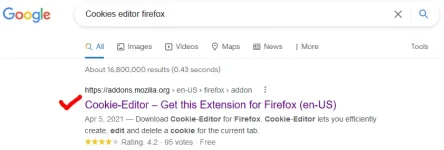
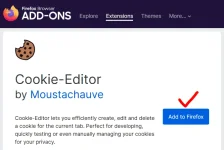
Click mo yong link tapos tap mo lang >>> "Add to Firefox ".
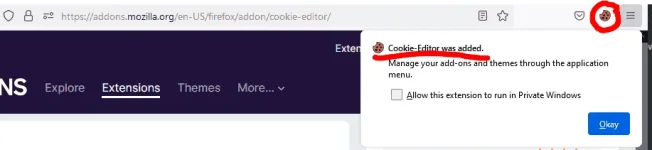
If Successful , may popup window na "Added" na siya at makikita mo ang icon sa upper top right.
Importing the Neatflex Cookies:
Depende kung paano ibinigay ng sharer, assuming na link URL siya so eto yong gagamitin natin.
Puntahan mo ang link at copy mo yong contents nya.
Sample Link >> You do not have permission to view the full content of this post.
Log in or register now.
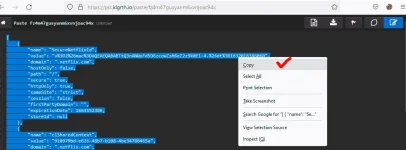
Tapos punta ka sa login/signin page sa NeatFlex website. Be sure to "Delete all" muna sa cookies editor bago mga import.
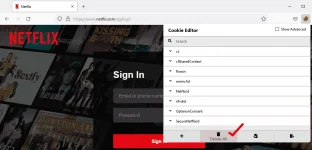
PS : Ignore mo lang yang SG kasi naka VPN ako 
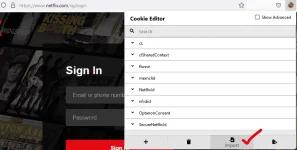
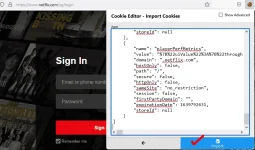
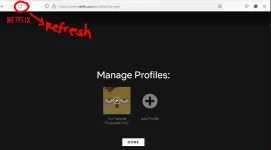
Lastly, import muna yong copied Cookies mo by pasting sa cookies editor.. Then refresh the page.... Voila !
Note:
Working on PC/Laptop This tutorial is intended sa mga wala pang knowledge nitoRelated Tutorial
 How to Download Neatflix Movies/Shows
Feedback makes us better


