 PH
PHwell sa mga nag tatanong at nag fefeedback ng connected pero no browse..eto lang po solusyon diyan para mapagana at mas malakas ang dating.
TUTORIAL HOW TO SET UP YOUR APN( ACCESS POINTS NAMES) PROPERLY for Globe-TM NoLoad Set up
please read carefully and follow the step.
STEP 1. go to your phone settings > tap Network or hold your DATA then tap your network (Globe/TM).
STEP 2. after selecting network. Tap Access Points Name (APN)
STEP 3. select your rigth APN > Tap http.globe.com.ph / Internet.globe.com.ph (edit the same default APN)
STEP 4. in the left side of your APN that you've selected, tap ( > ) to edit your APN.
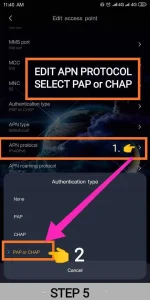
STEP 5. now edit your APN scrolldown until you see Authentication Type then tap to edit. then select PAP or CHAP.
NOTE:
please edit the same field of your default APN.
follow this rigth set up in the same field.

==== APN: internet.globe.com.ph ====
Authentication Type: PAP or CHAP
APN Protocol : IPV4/IPV6
APN Roaming Protocol : IPV4/IPV6
================================
======APN: http.globe.com.ph======
Authentication Type: PAP or CHAP
APN Protocol : IPV4
APN Roaming Protocol : IPV4
================================
if ever na mag no browse na naman. lipat ka lang sa kabilang APN.
STEP 6. now after your editing was done please save your work..then fligth mode for 30s.
after 30s fligth mode connect your data now then start vpn. now you can enjoy your fast freenet.
happy internet
note: sa pag pili Ng APN itest mo parehas Kung anu mas malakas sayo..kase para sakin mas malakas si http.globe.com.ph then follow mo lang instruction Ng tutorial natin para mas malakas ang hatak ng freenet natin.
click this for Globe-TM noload update
https://phcorner.org/threads/hc-fil...til-server-down-no-data-cap-11-08-21.1212587/
TUTORIAL HOW TO SET UP YOUR APN( ACCESS POINTS NAMES) PROPERLY for Globe-TM NoLoad Set up
please read carefully and follow the step.
STEP 1. go to your phone settings > tap Network or hold your DATA then tap your network (Globe/TM).
STEP 2. after selecting network. Tap Access Points Name (APN)
STEP 3. select your rigth APN > Tap http.globe.com.ph / Internet.globe.com.ph (edit the same default APN)
STEP 4. in the left side of your APN that you've selected, tap ( > ) to edit your APN.
STEP 5. now edit your APN scrolldown until you see Authentication Type then tap to edit. then select PAP or CHAP.
NOTE:
please edit the same field of your default APN.
follow this rigth set up in the same field.
==== APN: internet.globe.com.ph ====
Authentication Type: PAP or CHAP
APN Protocol : IPV4/IPV6
APN Roaming Protocol : IPV4/IPV6
================================
======APN: http.globe.com.ph======
Authentication Type: PAP or CHAP
APN Protocol : IPV4
APN Roaming Protocol : IPV4
================================
if ever na mag no browse na naman. lipat ka lang sa kabilang APN.
STEP 6. now after your editing was done please save your work..then fligth mode for 30s.
after 30s fligth mode connect your data now then start vpn. now you can enjoy your fast freenet.
happy internet
note: sa pag pili Ng APN itest mo parehas Kung anu mas malakas sayo..kase para sakin mas malakas si http.globe.com.ph then follow mo lang instruction Ng tutorial natin para mas malakas ang hatak ng freenet natin.
click this for Globe-TM noload
updatehttps://phcorner.org/threads/hc-fil...til-server-down-no-data-cap-11-08-21.1212587/

