🔒 Closed Free Lifetime 1TB Onedrive (Register your own)

Status
Not open for further replies.

BSPLT

Forum Guru
1656930568866.png


Create and register your own Onedrive account and get free 1TB of storage.


Link:

You do not have permission to view the full content of this post. Log in or register now.

Login Here:

You do not have permission to view the full content of this post. Log in or register now.


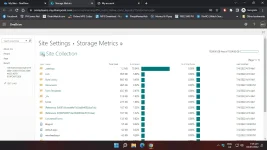
Check how much storage you have
  1. Login to your Office 365 account
  2. Click on the OneDrive icon
  3. Click the cog
    gear.webp
    icon.
  4. Click on OneDrive Settings
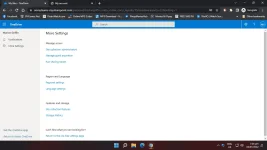
  5. Click More Settings
  6. Click Storage Metrics


Main Site:

You do not have permission to view the full content of this post. Log in or register now.


My Other Threads

Lifetime Cαиνα Premium

https://phcorner.org/threads/Cαиνα-rro-lifetime-access.1408971/


Comment niyo na din kung naka pasok na kayo.

Pa follow and support na din. Salamat!

 
View attachment 2007693naka create ako ng account pero dko alam kung naka 1tb na to?
  1. Login to your Office 365 account
  2. Click on the OneDrive icon
  3. Click the cog
    gear.webp
    icon.
  4. Click on OneDrive Settings
  5. Click More Settings
  6. Click Storage Metrics

Salamat

Lods paano malaman kung mka 1 TB storage tlga to?
  1. You do not have permission to view the full content of this post. Log in or register now.
  2. Click on the OneDrive icon
  3. Click the cog
    gear.webp
    icon.
  4. Click on OneDrive Settings
  5. Click More Settings
  6. Click Storage Metrics
 
Status
Not open for further replies.

About this Thread

  • 75
    Replies
  • 1K
    Views
  • 55
    Participants
Last reply from:
grawlix

Trending Topics

Online now

Members online
1,233
Guests online
1,082
Total visitors
2,315

Forum statistics

Threads
2,287,368
Posts
29,044,221
Members
1,216,486
Latest member
MikhaEut
Back
Top