 PH
PHDisabling feature updates
In addition, the advanced settings also let you disable feature updates from downloading and installing automatically, even though, these updates are now optional.
To disable feature updates for up to a year, use these steps:

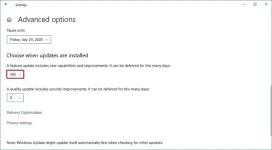
5. Under the "Pause updates" section, use the drop-down menu, and select the number of days you want to defer a new feature update.
Quick note: This option may not be available for everyone at the time they want to use it.
Once you complete the steps, the device won't receive feature updates until after the day you specified in the settings.
Microsoft no longer automatically forces new feature updates, and it's now a process that you must initiate manually. However, there are still some situations where you may want to use this option to disable these types of updates.
How to stop automatic updates on Windows 10
Disabling all updates
Disabling security updates
In addition, the advanced settings also let you disable feature updates from downloading and installing automatically, even though, these updates are now optional.
To disable feature updates for up to a year, use these steps:
- Open Settings.
- Click on Update & Security.
- Click on Windows Update.
- Click the Advanced options button.
5. Under the "Pause updates" section, use the drop-down menu, and select the number of days you want to defer a new feature update.
Quick note: This option may not be available for everyone at the time they want to use it.
Once you complete the steps, the device won't receive feature updates until after the day you specified in the settings.
Microsoft no longer automatically forces new feature updates, and it's now a process that you must initiate manually. However, there are still some situations where you may want to use this option to disable these types of updates.
How to stop automatic updates on Windows 10
Disabling all updates
Disabling security updates