PH
PHFirst Download this app:
App Cloner++: You do not have permission to view the full content of this post. Log in or register now.
Script: You do not have permission to view the full content of this post. Log in or register now.
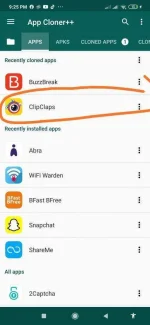
First step clone Clipclaps open App Cloner++ then click the following:
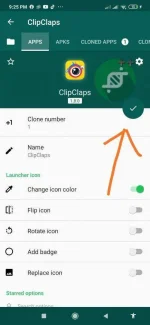
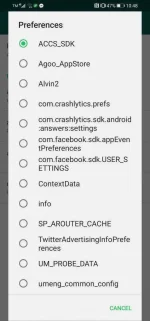
Then open the cloned Clipclaps app then login to your account then go back to the App Cloner ++ then press these:
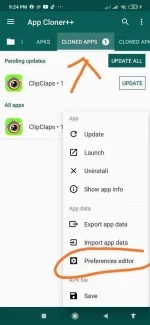
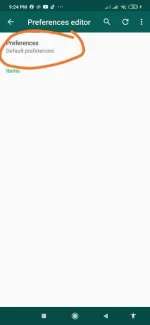
Hanapin niyo toh dito niyo makikita yung mga ilalagay sa termux
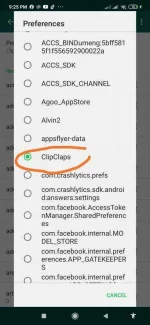
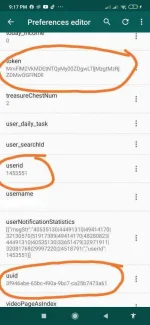
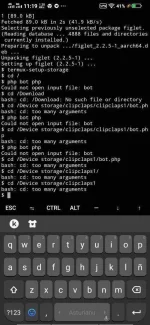
Then punta kayo sa termux type these commands:
$ pkg update && upgrade
$ apt update && upgrade
$ pkg install php
$ pkg install figlet
$ termux-setup-storage
$ cd /(folder location)
$ php bot php
$ (lagay niyo mga hinihingi)
$ (kayo bahala kung ano gusto niyong function type niyo lang yung number)
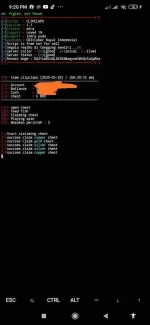
To stop the process just click ctrl+c to start the process type again php bot.php
Enjoy!!!
App Cloner++: You do not have permission to view the full content of this post. Log in or register now.
Script: You do not have permission to view the full content of this post. Log in or register now.
First step clone Clipclaps open App Cloner++ then click the following:
Then open the cloned Clipclaps app then login to your account then go back to the App Cloner ++ then press these:
Hanapin niyo toh dito niyo makikita yung mga ilalagay sa termux
Then punta kayo sa termux type these commands:
$ pkg update && upgrade
$ apt update && upgrade
$ pkg install php
$ pkg install figlet
$ termux-setup-storage
$ cd /(folder location)
$ php bot php
$ (lagay niyo mga hinihingi)
$ (kayo bahala kung ano gusto niyong function type niyo lang yung number)
To stop the process just click ctrl+c to start the process type again php bot.php
Enjoy!!!