 PH
PHMan with No Name
Forum Guru
FAN CONTROL
If you are looking for a program to control your CPU fan, GPU fans or system fans, then Argus Monitor might be the best program for that purpose.
With the fan control features, you can control the fans of your PC and set either a fixed fan speed or control them based on any of the temperature sources available on your system.
It is for instance possible to control the fan speeds of your case fans based on the temperatures of your CPU, the GPU temperature, disk temperatures, RAM temperatures, mainboard temperature sensors or sensor readings provided by an AIO or external fan controller — or a combination thereof.
Argus Monitor is an alternative to the well known tool SpeedFan.
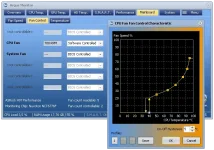
A prerequisite for using the fan control features of Argus Monitor is a supported SuperIO monitoring, a modern AMD/Nvidia GPU or a supported AIO cooling solution.
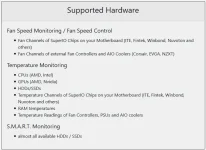
The program can control most commercially available monitoring chips from Nuvoton, ITE, Winbond, Fintek and SMSC, which are installed on the most widely used motherboards from Asus, Asrock, Gigabyte and MSI. In addition, fans on Lenovo Thinkpad and Dell notebooks can be controlled.
The speed of the fans can either be set to a fixed value or controlled with a characteristic curve depending on all available temperature sources.
All available temparature sources can be used as input for the fan controller, namely CPU temperature, GPU temperature, hard drive/SSD temperatures or temperature readings of all temperature sensors on the mainboard. For CPU and GPU temperatures also the average temperature over a (configurable) time span is available. As an advanced feature a combination of up to four of the above mentioned temperature values can be selected (more precisely the maximum control value of up to 6 independent controllers for every fan channel).
Argus Monitor - one of the best fan control tools available.
With the fan control features, you can control the fans of your PC and set either a fixed fan speed or control them based on any of the temperature sources available on your system.
It is for instance possible to control the fan speeds of your case fans based on the temperatures of your CPU, the GPU temperature, disk temperatures, RAM temperatures, mainboard temperature sensors or sensor readings provided by an AIO or external fan controller — or a combination thereof.
Argus Monitor is an alternative to the well known tool SpeedFan.
A prerequisite for using the fan control features of Argus Monitor is a supported SuperIO monitoring, a modern AMD/Nvidia GPU or a supported AIO cooling solution.
The program can control most commercially available monitoring chips from Nuvoton, ITE, Winbond, Fintek and SMSC, which are installed on the most widely used motherboards from Asus, Asrock, Gigabyte and MSI. In addition, fans on Lenovo Thinkpad and Dell notebooks can be controlled.
The speed of the fans can either be set to a fixed value or controlled with a characteristic curve depending on all available temperature sources.
All available temparature sources can be used as input for the fan controller, namely CPU temperature, GPU temperature, hard drive/SSD temperatures or temperature readings of all temperature sensors on the mainboard. For CPU and GPU temperatures also the average temperature over a (configurable) time span is available. As an advanced feature a combination of up to four of the above mentioned temperature values can be selected (more precisely the maximum control value of up to 6 independent controllers for every fan channel).
Argus Monitor - one of the best fan control tools available.
SMART monitoring of hard disk drives and SSDs
Since the first release of Argus Monitor in 2009 the program offers functionality to monitor the status of HDDs and since there avaiability in the mass market also of those of SSDs.
Argus Monitor runs as a background task and constantly monitors the status of your hard disks. You will be informed in case one of the critical S.M.A.R.T. values changes. If one of the attributes reaches a vendor specified threshold, you will also get a warning that the hard drive is likely to fail within the next 24 hours of operation. Argus Monitor also stores the S.M.A.R.T. status of every drive (even the ones attached only from time to time - e.g. via S-ATA) and will be able to warn you of decreased drive status even if the hard drive was attached to another PC when the value decreased.
Argus Monitor runs as a background task and constantly monitors the status of your hard disks. You will be informed in case one of the critical S.M.A.R.T. values changes. If one of the attributes reaches a vendor specified threshold, you will also get a warning that the hard drive is likely to fail within the next 24 hours of operation. Argus Monitor also stores the S.M.A.R.T. status of every drive (even the ones attached only from time to time - e.g. via S-ATA) and will be able to warn you of decreased drive status even if the hard drive was attached to another PC when the value decreased.
 DOWNLOAD
DOWNLOAD 
