 PH
PH
I-activate natin Windows at MS Office apps mo ng walang ginagamit na tools na possible ma-infect ka pa ng malware. In this method, di mo na need isipin yan kasi You do not have permission to view the full content of this post. Log in or register now. ito. This method works on Windows 8-11 and MS Office apps too. Introducing, You do not have permission to view the full content of this post. Log in or register now. You do not have permission to view the full content of this post. Log in or register now..
May sarili syang post sa kanyang GitHub account that you can follow, but if gusto mo ng Tagalog version ng tutorial na yun, then this post is for you.
The PowerShell Method
1. Buksan nyo si PowerShell (hindi yung CMD ha). Para magawa mo yun, i-right click mo yung Windows Start Menu then piliin mo yung Powershell or Windows Terminal.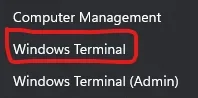
2. I-copy at i-ipaste sa loob ng PowerShell or Windows Terminal ang code na nasa baba:
Code:
irm https://get.activated.win | iex3. Lalabas na yung mga options dyan, piliin mo yung need mo i-activate.
Choose [1] if gusto mo mag-activate ng Windows.
Choose [2] if gusto mo i-activate yung MS Offices mo.
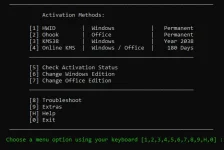
4. Then done! Okay na yan and you can now verify kung activated na ba talaga by going to Settings then accessing About my PC.
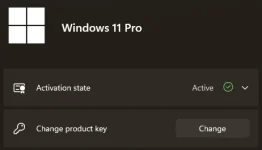
Yun lang mga ka-PHC! If may mga tanong kayo, just comment down below and I'll try na makatulong sa inyo or mga ibang members here sa PHC. Kayo na bahala if want nyo mag-thank you by leaving a Like or a comment.