 PH
PHHave you noticed your brand spanking new LTE-A device not providing the bandwidth you expected in your setup, despite having strong LTE signals in your area?
If yes, then it may be because of this fundamental network parameter that needs a little tweaking, that MAY give the needed boost.
Before you make changes, conduct a couple of speed tests first before, and then after you made the change for appreciation.
For the technically inclined, or if you wish to learn more on the topic, then head over to You do not have permission to view the full content of this post. Log in or register now. to know more.
The MTU on the D2K-FT10 is configured at a default of 1400 bytes. The optimal, as well as the maximum, size for Ethernet is 1500 bytes. In layman's terms, Maximum MTU = Maximum Throughput, given the conditions of your connection (cabling, interference, signal quality, etc.).
To change the MTU, head over to
You do not have permission to view the full content of this post. Log in or register now. or
You do not have permission to view the full content of this post. Log in or register now.
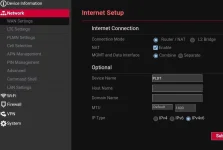
Change the MTU from Default to Manual, and type in 1500.
Here's my speedtest done after the change, over the LAN that is bottlenecked by the test device being only fast ethernet (100 Mbps), with a look at the bufferbloat situation on the ISP side(no traffic shaping on my end):
Smart/PLDT has been doing some traffic shaping for quite some time now. You can see that bufferbloat is well-managed on the upload, but not on the download.
Do note that there is no one-size-fits-all value for this setting. You need to experiment to find out what works for you to achieve your goal of maximum throughput (downloading, streaming, etc.) or minimum latency (gaming), or stick with the optimal value.
Have fun tweaking your network.
If yes, then it may be because of this fundamental network parameter that needs a little tweaking, that MAY give the needed boost.
Before you make changes, conduct a couple of speed tests first before, and then after you made the change for appreciation.
For the technically inclined, or if you wish to learn more on the topic, then head over to You do not have permission to view the full content of this post. Log in or register now. to know more.
The MTU on the D2K-FT10 is configured at a default of 1400 bytes. The optimal, as well as the maximum, size for Ethernet is 1500 bytes. In layman's terms, Maximum MTU = Maximum Throughput, given the conditions of your connection (cabling, interference, signal quality, etc.).
To change the MTU, head over to
You do not have permission to view the full content of this post. Log in or register now. or
You do not have permission to view the full content of this post. Log in or register now.
Change the MTU from Default to Manual, and type in 1500.
Here's my speedtest done after the change, over the LAN that is bottlenecked by the test device being only fast ethernet (100 Mbps), with a look at the bufferbloat situation on the ISP side(no traffic shaping on my end):
Code:
root@opione:~# ./betterspeedtest.sh
2021-10-14 00:12:12 Testing against netperf.bufferbloat.net (ipv4) with 5 simultaneous sessions while pinging gstatic.com (60 seconds in each direction)
..............................................................
 Download: 91.45 Mbps
  Latency: (in msec, 62 pings, 0.00% packet loss)
      Min: 34.700
    10pct: 169.000
   Median: 180.000
      Avg: 193.389
    90pct: 241.000
      Max: 553.000
................................................................
   Upload: 36.18 Mbps
  Latency: (in msec, 64 pings, 0.00% packet loss)
      Min: 36.000
    10pct: 41.800
   Median: 44.700
      Avg: 46.637
    90pct: 53.700
Max: 64.700Do note that there is no one-size-fits-all value for this setting. You need to experiment to find out what works for you to achieve your goal of maximum throughput (downloading, streaming, etc.) or minimum latency (gaming), or stick with the optimal value.
Have fun tweaking your network.

 You need to inspect element the page to unhide it. Search the web for tutorials on how to unhide hidden elements in the page. They are hidden in div tags with display:none styling.


