🔒 Closed Computer Technician Pa help !!

Status
Not open for further replies.

dev-ace

Forum Expert
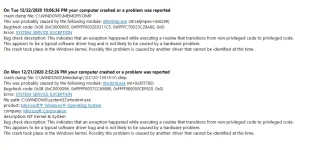
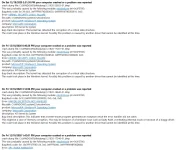
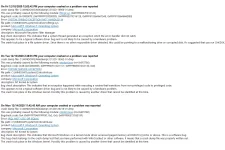
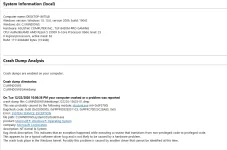
Nakakailang BSOD nakase ako :/ at nakakailang youtube tutorials narin ako at google . na itroubleshoot ko na rin at na itry na i fix kaso may random BSOD pa rin ako na eencounter .. eto po yung mga BSOD errors na na ithrothrow ng system ko .. yung BSOD nasa images na inupload ko nandyan mga 5 types of BSOD ata then yung iba paulit ulit na eencounter .. 11 times na nag BSOD from NOV to DEC randomly .

Trouble shoot na ginawa ko is :
delete tmp files ,
update drivers
update OS
Scan for viruses .
Reseat Ram
Test Ram via Memory Diagnostic Tool ( No issue naman )
System Scan

Etc .
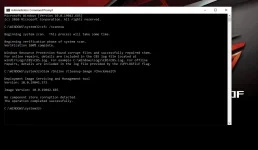
Eto result ng Memory Diagnostic Tool
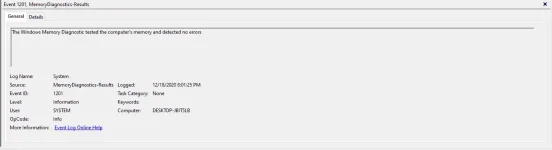
memorydiagnosticresult.PNG


errorbsod.PNG


Sa tingin nyo ano kaya mabisang remediya para dito ? Nasa isip ko is eh RESET ko yung OS ko if not working pa rin try ko RE-INSTALL OS if wala pa rin sguro baka hardware na ? pero good as new naman lahat ng components ko .. :/
 

Attachments

  • 1.webp
    1.webp
    65.7 KB · Views: 30
  • 2.webp
    2.webp
    74.2 KB · Views: 28
  • 3.webp
    3.webp
    122.7 KB · Views: 26
  • 4.webp
    4.webp
    13.8 KB · Views: 30
  • Capture.webp
    Capture.webp
    130 KB · Views: 31
boss naka post napo ginamitan ko ng software para ma detect lahat ng BSOD :) and yung ram na check ko na yung ram paki read nalang ng post :) no issue yung ram dalawang stick papalit2 nalinis ko na rin thru eraser method . na reseat ko narin
 
tulongges kase yung BSOD sa PC ko random lang talaga lumalabas pero hindi after boot BSOD agad sguro mga after an hour or higit pa dun lalabas BSOD RANDOMLY . Which is walang accurate time frame kaya dko mahuli2 and dalawang .exe file yung suspect ni windows then pag research ko lahat halos ng solution is need to reinstall OS kaya nag jump nako sa solution na reinstall na . sangayon is fresh na yung OS ko and parang mas bumilis sya .. and yung graphics ng pc ko is lalong naging smooth .. lumamig rin temp ng cpu ko .. at lumiit kain ng ram . sguro expected narin to kc fresh pero post nlg ako ng update dito if ever may ma encounter ulit ..
 
[XX='alasacelui, c: 608996, m: 714257'][/XX] ganyan ginawa ko sa pc ko, download ng installer using media creator tool tapos ginamitan ko na lang ng ac†ïvâ†ør
 
Honest issues pag BSOD ay hardware or software driver.. try mo linisin pc mo or baka may ininstall ka na update or driver na di nmn akma sa pc mo ..much better re-os mo nlng an daming w10 n may pre-activated na..
 
may error naman yan lods. basahin mo lang.tapos search mo sa google. para malaman mo kung ano gagawin mo. pero kung OS issue madalas yan nag uupdate yung PC tapos si User finorce turn off kasi naiinip sa sobrang tagal ng update.
 
Status
Not open for further replies.

Similar threads

About this Thread

  • 62
    Replies
  • 2K
    Views
  • 21
    Participants
Last reply from:
dev-ace

Trending Topics

Online now

Members online
763
Guests online
1,587
Total visitors
2,350

Forum statistics

Threads
2,271,627
Posts
28,936,933
Members
1,238,732
Latest member
sallie
Back
Top