 PH
PHI just want to share kung anu yung mga nakal-kal ko sa Youtube... 
This tutorial teach you how to remove annoying viruses in your computer, most reasons ay yung mga flash drive na infected na bigla nalang sinasaksak sa computer mo
 This image has been resized. Click this bar to view the full image. The original image is sized 728x609.

 This image has been resized. Click this bar to view the full image. The original image is sized 1024x768.
http://img140.imageshäçk.us/img140/2805/recyclevirus1.png
 This image has been resized. Click this bar to view the full image. The original image is sized 1280x1024.


First, you must download this following software:
1. HitMan Pro You do not have permission to view the full content of this post. Log in or register now.
2. Virus Removal Tool (Kaspersky) You do not have permission to view the full content of this post. Log in or register now.
3. Malware bytes link
4. Super Anti-Spyware You do not have permission to view the full content of this post. Log in or register now.
5. Norton Power Eraser You do not have permission to view the full content of this post. Log in or register now.
6. CCleaner Business/Pro You do not have permission to view the full content of this post. Log in or register now.
Note: just download all freeware or select trial version except CCleaner.
Then, save it to your USB flash drive
Note: it would be better if my write-protect switch yung flash drive niyo or either try to use SD-card kasi may mga write-protect switch yan...
para kung sakali daliin ng virus yung USB niyo hindi siya ma-apektuhan gets!

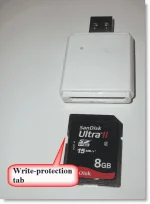
Next!
Restart yung computer na kailangan irepair...
Instructions:
1st, you must disable all start-up application in safe mode (press F8 on your keyboard upon booting)

2nd, go to run then type: msconfig then press Enter

click start-up tab - to view start up application
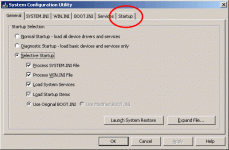
then uncheck mo yung mga nasa start-up or press Disable All then OK, and restart the computer again.
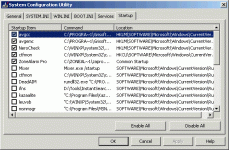
Now switch to safe mode with network
3rd, run/install mo yong mga software na nadownload mo.
1. HitMan Pro - most detected - adware and trojan, just run and select trial
2. Virus Removal Tool (Kaspersky) - detect most dangerous virus, just run no need to install.
3. Malware bytes - most useful but careful can delete the crack programs, need to install and update before you scan. if you don't have internet ok just scan.
4. Super Anti-Spyware - most useful to delete spywares and adwares can reset also your setting affected by viruses, still need to install and just hit trial version
5. Norton Power Eraser - need to restart your computer but still swicth to safemode
6. CCleaner Business/Pro - can clean-up your computer and repair registry, need to install and it's up to you if you want to keep if in your computer or you uninstall
Note: Pag may internet, kailangan update niyo muna yung mga software bago mag-scan...ok!
Then scan niyo yung computer niyo using that software
Note: wag niyong pagsabayin para hindi bumagal yung pag-scan...
screenshots as follows...kung hindi magets
Alternative free antivirus software and tools:
-You do not have permission to view the full content of this post. Log in or register now. - ito gusto ko din kasi naayos yung sira ng OS mo peru matagal magscan tsaka dapat mo disable yung ibang nag-run na anti-virus para hindi magconflict.
-You do not have permission to view the full content of this post. Log in or register now.
-You do not have permission to view the full content of this post. Log in or register now. - most recommended na pinakamagaan na anti-virus for windows but make sure na genuine yung OS niyo kasi mahuhuli yan
-You do not have permission to view the full content of this post. Log in or register now.
-You do not have permission to view the full content of this post. Log in or register now.
note: those software are for cleaning purposes only, so uninstall niyo lang pagkatapos niyong magscan at repair...
don't leave naka-install lahat yan at baka bumagal yung computer niyo...ok
Share lang... Credit sa gumawa ng video sa youtube pero hindi ko na manahanap
Don't forget to hit Thanks...kung nakakatulong
This tutorial teach you how to remove annoying viruses in your computer, most reasons ay yung mga flash drive na infected na bigla nalang sinasaksak sa computer mo
This image has been resized. Click this bar to view the full image. The original image is sized 728x609.
This image has been resized. Click this bar to view the full image. The original image is sized 1024x768.http://img140.imageshäçk.us/img140/2805/recyclevirus1.png
This image has been resized. Click this bar to view the full image. The original image is sized 1280x1024.
First, you must download this following software:
1. HitMan Pro You do not have permission to view the full content of this post. Log in or register now.
2. Virus Removal Tool (Kaspersky) You do not have permission to view the full content of this post. Log in or register now.
3. Malware bytes link
4. Super Anti-Spyware You do not have permission to view the full content of this post. Log in or register now.
5. Norton Power Eraser You do not have permission to view the full content of this post. Log in or register now.
6. CCleaner Business/Pro You do not have permission to view the full content of this post. Log in or register now.
Note: just download all freeware
or select trial version except CCleaner.Then, save it to your USB flash drive
Note: it would be better if my write-protect switch yung flash drive niyo or either try to use SD-card kasi may mga write-protect switch yan...
para kung sakali daliin ng virus yung USB niyo hindi siya ma-apektuhan gets!
Next!
Restart yung computer na kailangan irepair...
Instructions:
1st, you must disable all start-up application in safe mode (press F8 on your keyboard upon booting)
2nd, go to run then type: msconfig then press Enter
click start-up tab - to view start up application
then uncheck mo yung mga nasa start-up or press Disable All then OK, and restart the computer again.
Now switch to safe mode with network
3rd, run/install mo yong mga software na nadownload mo.
1. HitMan Pro - most detected - adware and trojan, just run and select trial
2. Virus Removal Tool (Kaspersky) - detect most dangerous virus, just run no need to install.
3. Malware bytes - most useful but careful can delete the crack programs, need to install and update before you scan. if you don't have internet ok just scan.
4. Super Anti-Spyware - most useful to delete spywares and adwares can reset also your setting affected by viruses, still need to install and just hit trial version
5. Norton Power Eraser - need to restart your computer but still swicth to safemode
6. CCleaner Business/Pro - can clean-up your computer and repair registry, need to install and it's up to you if you want to keep if in your computer or you uninstall
Note: Pag may internet, kailangan update niyo muna yung mga software bago mag-scan...ok!
Then scan niyo yung computer niyo using that software
Note: wag niyong pagsabayin para hindi bumagal yung pag-scan...
screenshots as follows...kung hindi magets
Alternative free antivirus software and tools:
-You do not have permission to view the full content of this post. Log in or register now. - ito gusto ko din kasi naayos yung sira ng OS mo peru matagal magscan tsaka dapat mo disable yung ibang nag-run na anti-virus para hindi magconflict.
-You do not have permission to view the full content of this post. Log in or register now.
-You do not have permission to view the full content of this post. Log in or register now. - most recommended na pinakamagaan na anti-virus for windows but make sure na genuine yung OS niyo kasi mahuhuli yan
-You do not have permission to view the full content of this post. Log in or register now.
-You do not have permission to view the full content of this post. Log in or register now.
note: those software are for cleaning purposes only, so uninstall niyo lang pagkatapos niyong magscan at repair...
don't leave naka-install lahat yan at baka bumagal yung computer niyo...ok
Share lang... Credit sa gumawa ng video sa youtube pero hindi ko na manahanap
Don't forget to hit Thanks...kung nakakatulong
