 PH
PH-
Welcome to PHCorner Forums! Sign up for free to unlock full access and exclusive privileges, including:
- Asking questions about computer and mobile issues
- Discovering internet tips for your mobile network and computer
You are using an out of date browser. It may not display this or other websites correctly.
You should upgrade or use an alternative browser.
You should upgrade or use an alternative browser.
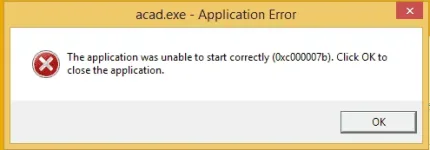
🔒 Closed someone know how to resolve .dll error system "the application was unable to start co
- Thread starter sh3h21
- Start date
- Status
- Not open for further replies.
tasogareuwu
Eternal Poster
Google the .dll missing download it try to put it on the software's installation folder if it didn't work try copying it on SysWOW64 if you use 32-bit which is rare copy it to system32
ICE Coffee
⭐⭐☕⭐⭐
try putting it in SysWOW64, dll depends on your systems version (64-bit or 32-bit)
and make sure you've downloaded the right app version, it should be compatible on your system version
and make sure you've downloaded the right app version, it should be compatible on your system version


ICE Coffee
⭐⭐☕⭐⭐
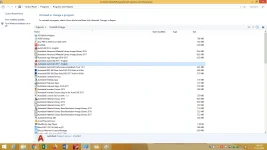
[XX='sh3h21, c: 561173, m: 745321'][/XX] try uninstalling MS Visual C++, then try re installing app
You do not have permission to view the full content of this post.
Log in or register now.
go to the above link download the .rar file extract it and paste all the contents of the folder in windows>system32.If you are using 64 bit you need to paste all the contents in syswow64 folder aswell
this is from microsoft forum
go to the above link download the .rar file extract it and paste all the contents of the folder in windows>system32.If you are using 64 bit you need to paste all the contents in syswow64 folder aswell
this is from microsoft forum
donteatmeat
Forum Expert
recommend ko sayo 3.5 and up.. (mas maganda kung lahat ng install mo para wala kang issue sa future na iiinstall mo.. dahil common na issue yan noon sa mga games.. kaya alam na alam ko kung anong error yan
donteatmeat
Forum Expert
since mukhang naka windows 8 ka.. naka build na diyan ang 2.0.. mga 3.5 and up
donteatmeat
Forum Expert
and i think kundi corrupted nawawala itong dll na nito
vcruntime140.dll & msvcp140.dll
vcruntime140.dll & msvcp140.dll
bhokk062220
Enthusiast
VCredist kulang boss check mo ung application na ayaw magstart para malaman mo kung anung version ang kailangan mong vcredist
You do not have permission to view the full content of this post. Log in or register now.
download the file and copy/paste it to your app installation folder
You do not have permission to view the full content of this post. Log in or register now.
download the file and copy/paste it to your app installation folder
- Status
- Not open for further replies.
About this Thread
-
23Replies
-
2KViews
-
9Participants
Last reply from:
ICE Coffee
ICE Coffee
New Topics
-
TEMPORARY EMAIL NA HINDI NADEDETECT AS TEMPORARY EMAIL
- Started by 21banana
- Replies: 1
- ❓ Computer Discussion & Support
-
Looking for CSI ETABS Ultimate 2026 v23.2 Acïvâør
- Started by talaotep
- Replies: 0
- ❓ Computer Discussion & Support
-
I need help about my pc
- Started by lex2133
- Replies: 6
- ❓ Computer Discussion & Support
-
Start up boot so slow?
- Started by babyoriokiko
- Replies: 20
- ❓ Computer Discussion & Support
-
Patulong po about sa reset sa pc
- Started by toledo095
- Replies: 1
- ❓ Computer Discussion & Support
-
Help how to download and install part file
- Started by ECLIPVEIL
- Replies: 2
- ❓ Computer Discussion & Support
-
Pc repair estimated price help
- Started by Anchora
- Replies: 7
- ❓ Computer Discussion & Support
-
Boot manager missing
- Started by Scare You
- Replies: 5
- ❓ Computer Discussion & Support
Trending Topics
Online now
- Members online
- 1,003
- Guests online
- 8,794
- Total visitors
- 9,797