 PH
PHAko Idol Mo
Elite
BEFORE WE START DOWNLOAD MUNA KAYO
WIFI ANALYZER
APP:
And e prepare ang inyong modem or router.
If nasa residential area ka like maraming wifi and then nag o-online class ka tas slow pa wifi mo ito gawin mo
1.OPEN THE APP WIFI ANALYZER
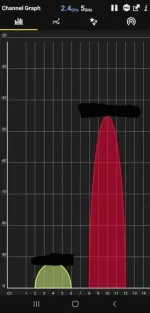
Gawin mo dito lodi is check mo yung wifi mo as you can see hindi ko sila dinikit kasi pag dinikit ko sila (it may cause slow internet connection) kaya nag mo-move ako papalayo para di magka slow ang iyung wifi.
2. LOGIN TO YOUR ROUTER
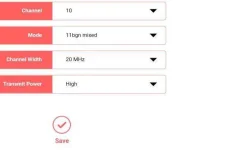
And hanapin mo ang channel ito and as you can see sa first pic mga lodi noh find a space na malayo² sa kapitbahay nyo for example naka dikit ako sa kapitbahay ko kaya move ako ng kaunti example nasa channel 2 4 siya lilipat ako sa CHANNEL 10 14 or 9 14
3.THEN SAVE NA MGA LODI!!!
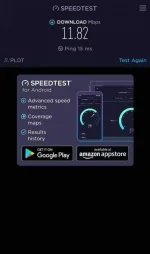
4.DO A SPEED TEST (SO ITO YUNG RESULT KO)
 BONUS! BONUS! BONUS!
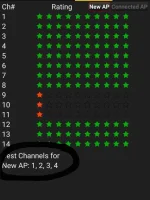
If di ka makahanap ng saktong channel for your wifi then punta ka sa WIFI ANALYZER app at then dito.

Read Carefully Po!
WIFI ANALYZER
APP:
Spoiler contents are visible only to Established Members.
If nasa residential area ka like maraming wifi and then nag o-online class ka tas slow pa wifi mo ito gawin mo
1.OPEN THE APP WIFI ANALYZER
Gawin mo dito lodi is check mo yung wifi mo as you can see hindi ko sila dinikit kasi pag dinikit ko sila (it may cause slow internet connection) kaya nag mo-move ako papalayo para di magka slow ang iyung wifi.
2. LOGIN TO YOUR ROUTER
And hanapin mo ang channel ito and as you can see sa first pic mga lodi noh find a space na malayo² sa kapitbahay nyo for example naka dikit ako sa kapitbahay ko kaya move ako ng kaunti example nasa channel 2 4 siya lilipat ako sa CHANNEL 10 14 or 9 14
3.THEN SAVE NA MGA LODI!!!
4.DO A SPEED TEST (SO ITO YUNG RESULT KO)
BONUS! BONUS! BONUS!If di ka makahanap ng saktong channel for your wifi then punta ka sa WIFI ANALYZER app at then dito.
Read Carefully Po!