 PH
PH-
Welcome to PHCorner Forums! Sign up for free to unlock full access and exclusive privileges, including:
- Asking questions about computer and mobile issues
- Discovering internet tips for your mobile network and computer
You are using an out of date browser. It may not display this or other websites correctly.
You should upgrade or use an alternative browser.
You should upgrade or use an alternative browser.
🔒 Closed "set address failed" usb device
- Thread starter riezel
- Start date
- Status
- Not open for further replies.
ICE Coffee
⭐⭐☕⭐⭐
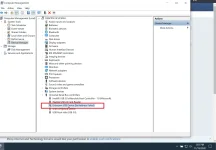
o kaya try mo ito
1. Press Win+R to open Run.
2. Type cpl and press Enter to directly open Power Options.
3. Click the Change plan settings link that is next to the preferred plan the system selects.
4. Click the Change advanced power settings link to continue.
5. Scroll down to the USB settings section and then set Disable for both the scenarios: On Battery and Plugged in.
6. Click OK to keep the change.
1. Press Win+R to open Run.
2. Type cpl and press Enter to directly open Power Options.
3. Click the Change plan settings link that is next to the preferred plan the system selects.
4. Click the Change advanced power settings link to continue.
5. Scroll down to the USB settings section and then set Disable for both the scenarios: On Battery and Plugged in.
6. Click OK to keep the change.
ICE Coffee
⭐⭐☕⭐⭐
[XX='riezel, c: 507896, m: 79732'][/XX] hindi mo ba sya nakikita sa disk management??

ICE Coffee
⭐⭐☕⭐⭐
[XX='riezel, c: 507907, m: 79732'][/XX] pero ok yung drive mo?? mag restart ka nga ng pc mo
ICE Coffee
⭐⭐☕⭐⭐
[XX='riezel, c: 507921, m: 79732'][/XX] format mo na lang sya master kung wala naman mga important files jan
ICE Coffee
⭐⭐☕⭐⭐
[XX='riezel, c: 507954, m: 79732'][/XX] laptop ba gamit mo or desktop??
ICE Coffee
⭐⭐☕⭐⭐
[XX='riezel, c: 507990, m: 79732'][/XX] kala ko desktop mas madali lang sana mag salpak, gamit ka na lang ng tools paps para ma format mo yan, try mo yung easeUS
ICE Coffee
⭐⭐☕⭐⭐
[XX='riezel, c: 508019, m: 79732'][/XX] walang anuman master
- Status
- Not open for further replies.
About this Thread
-
16Replies
-
416Views
-
2Participants
Last reply from:
ICE Coffee
ICE Coffee
New Topics
-
Dapat ba akong maalarma dito? Nagback-up na paunti-unti ako.
- Started by Jeii
- Replies: 0
- ❓ Computer Discussion & Support
-
Realtek audio missing in device manager
- Started by PHC-MERCURIAL
- Replies: 3
- ❓ Computer Discussion & Support
-
Suggest OS para sa budget pc yung lightweight.
- Started by YourR3ze
- Replies: 2
- ❓ Computer Discussion & Support
-
Microsoft copilot personal
- Started by WEIRJD
- Replies: 0
- ❓ Computer Discussion & Support
-
Lock profile or browser?
- Started by heyhey
- Replies: 7
- ❓ Computer Discussion & Support
-
Light/Gaming OS for 4 year old laptop
- Started by Genesis Storm
- Replies: 10
- ❓ Computer Discussion & Support
-
HWID SPOOFER HELP!
- Started by Balisain
- Replies: 0
- ❓ Computer Discussion & Support
-
LIGHTROOM APP PC
- Started by WHOOISDIYAAM
- Replies: 1
- ❓ Computer Discussion & Support
-
Active Directory tutorial
- Started by Allergies
- Replies: 1
- ❓ Computer Discussion & Support
-
Hide Yuzu or any emulator
- Started by izanagi07
- Replies: 1
- ❓ Computer Discussion & Support
Trending Topics
Online now
- Members online
- 1,110
- Guests online
- 2,569
- Total visitors
- 3,679