PH
PHHow To Boot A USB or Pen Drive
To Boot Your USB Follow These Steps -:
1). Click on start..
2). Search cmd
3). Right Click On it
Then Click On Run as Administration
After Opening Cmd
A new windows Will apeear
Then Type
4). DISK-PART ............Then Press Enter
*********** Pen Drive then...
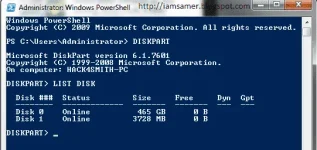
Type-: List Disk ......press enter
You See That Disk
Now type-: Select Disk 1 ......press enter
Type-: Clean ......press enter
Type-: Create partition primary ......press enter
Type-: Select partition 1
Type-: Select Partition 1 ......press enter
Type-: active ......press enter
Type-: Format fs=ntfs quick ......press enter
Type-: Assign ......press enter
Copy Windows File and paste in Booted pen drive And Enjoy........
To Boot Your USB Follow These Steps -:
1). Click on start..
2). Search cmd
3). Right Click On it
Then Click On Run as Administration
After Opening Cmd
A new windows Will apeear
Then Type
4). DISK-PART ............Then Press Enter
*********** Pen Drive then...
Type-: List Disk ......press enter
You See That Disk
Now type-: Select Disk 1 ......press enter
Type-: Clean ......press enter
Type-: Create partition primary ......press enter
Type-: Select partition 1
Type-: Select Partition 1 ......press enter
Type-: active ......press enter
Type-: Format fs=ntfs quick ......press enter
Type-: Assign ......press enter
Copy Windows File and paste in Booted pen drive And Enjoy........