 PH
PHAlienware Invader

Link: You do not have permission to view the full content of this post. Log in or register now.
Alienware Eclipse
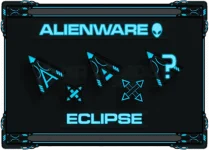
Link: You do not have permission to view the full content of this post. Log in or register now.
How to install:
1. Extract the zip files.
2.Open the folder and right click the install.inf (Setup Information)
3.In Windows, search for mouse settings/properties
4.In the Mouse Settings/Properties window, click the Pointers tab. To choose a the alienware pointer image: In the Scheme drop down box, select either the Alienware Eclipse or the Alienware Invader then click Apply.
5.Click OK to save your changes.
Link: You do not have permission to view the full content of this post. Log in or register now.
Alienware Eclipse
Link: You do not have permission to view the full content of this post. Log in or register now.
How to install:
1. Extract the zip files.
2.Open the folder and right click the install.inf (Setup Information)
3.In Windows, search for mouse settings/properties
4.In the Mouse Settings/Properties window, click the Pointers tab. To choose a the alienware pointer image: In the Scheme drop down box, select either the Alienware Eclipse or the Alienware Invader then click Apply.
5.Click OK to save your changes.