PH
PHSa mga nagkaka error, na install nyo ba ang Tap Adapter?
Just install po yung Tap adapter na inattach ko jan.. dapat ha Run as Admin at kung Windows 7 kayo, need nyo pa ng confirmation
Updates:
Download New configs below!
and
Edit your Proxy
Choose any of these (pag di na gumana yung gamit nyo)
Sample lang ito
HINT: Commonly used is Squid Proxy Pero pwede parin yung ibang proxy basta HTTPS!
TIPS: Pagka connect nyo, test agad kayo ng mga working proxies para di kayo mawalan!
Hello mga PHCitizens! It's good to be back!
Napansin kong nangangatay na si Trams kaya nang halungkat ako sa aking baul
Gayun din naman, nanghalungkat ako sa ibat ibang sites, naghahanap ng compatible na build sa trick ko ngayon.. (credits sa kanya, di kasi ako marunong mag build ng openvpn )
)
actually, matagal na ito.. best alternative sa mga di masyadong HEAVY users at for educational purposes lang (research, assignment, etc)
Requirements:
Responsable kayo kung pano nyo gamitin ng tama ang trick Good night! see you again next time kapag di na ako busy hehe
Nga pala, ang password ay xtremebasic.phc.onl/#forbidden# (blog ko hehe)
Just install po yung Tap adapter na inattach ko jan.. dapat ha Run as Admin at kung Windows 7 kayo, need nyo pa ng confirmation
Updates:
Download New configs below!
and
Edit your Proxy
Choose any of these (pag di na gumana yung gamit nyo)
Sample lang ito
For more proxy, go to this You do not have permission to view the full content of this post. Log in or register now.66.172.10.87 3128
213.42.245.74 80
94.100.63.2 8080
HINT: Commonly used is Squid Proxy
Pero pwede parin yung ibang proxy basta HTTPS!TIPS: Pagka connect nyo, test agad kayo ng mga working proxies para di kayo mawalan!
Hello mga PHCitizens! It's good to be back!
Napansin kong nangangatay na si Trams kaya nang halungkat ako sa aking baul
Gayun din naman, nanghalungkat ako sa ibat ibang sites, naghahanap ng compatible na build sa trick ko ngayon.. (credits sa kanya, di kasi ako marunong mag build ng openvpn
)actually, matagal na ito.. best alternative sa mga di masyadong HEAVY users at for educational purposes lang (research, assignment, etc)
Requirements:
- FinchVPN account (account.key)
- Config ko
- OpenVPN build na binigay sa akin ni Jhonples (friend ko sa FB) na galing sa kabila hahaha
- Disposable email account (na alam na alam nyo na marami ako
 )
)
- Download Openvpn, Tap adapter, at config ko
- Register sa FinchVPN using my Disposable email (Note: 1 time registration na ha? 3Gig per month lang, wag kang masyadong abusado.. ikaw rin, baka mawalan ka )
Spoiler contents are visible only to Established Members. - Pumunta sa You do not have permission to view the full content of this post.
Log in or register now. para i-claim ang activation link (yung username na niregister mo sa FinchVPN)
Example

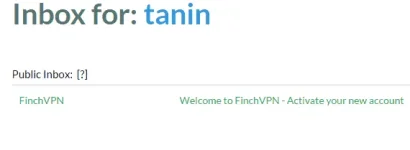
- Kapag natapos nang ma activate, download mo ang account.key at i-paste sa config folder na naka-locate sa loob ng OpenVPN na na extract kanina

Copy mo ang API Key
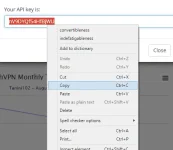
Paste mo sa account.key sa baba ng User name mo nung nag register ka sa FinchVPN
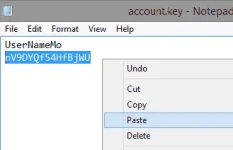
And then, SAVE (Ctrl+S)
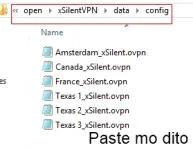
Basta dito nyo i-paste ang account.key haha (nakalimutan kong ilagay )
)
- Install nyo ang Tap adapter (Run as admin)
- Run as Admin lagi ang OpenvpnPortable.exe
- Connect to any server
- Enjoy!
- Browsing
- Downloading (kung mapilit talaga kayo, basta bahala na kayo kung makatay)
- Clash of Clans! and other online game (pwedeng gamitin sa phone)
Responsable kayo kung pano nyo gamitin ng tama ang trick
Good night! see you again next time kapag di na ako busy heheNga pala, ang password ay xtremebasic.phc.onl/#forbidden# (blog ko hehe)