 PH
PHDownload any streaming video using only Google Chrome browser.
WITHOUT INSTALLING ANYTHING.
INSTRUCTIONS:
open your Google Chrome and go to the video you want to download.
click Tools -->More tools --> Developer tools
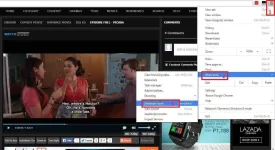
click --> Network
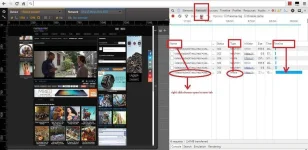
Play the video and look below for longest timeline.
if it say media / video / flv on type, right click it's name and choose open in new tab.
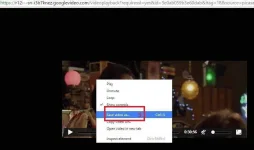
Go to the newly open tab
right click on the screen and click--> save video as
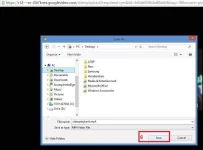
--> choose were you want to save your video
rename if you want,
and click save.
your Download will start.
enjoy watching it offline or share with fee.
Happy earning mga ka-PH!
ONLINE SALES GO TO:
You do not have permission to view the full content of this post. Log in or register now.
You do not have permission to view the full content of this post. Log in or register now.
or You do not have permission to view the full content of this post. Log in or register now.
Hurry While supplies last!!!
Limited to stock on hand!!!
WITHOUT INSTALLING ANYTHING.
INSTRUCTIONS:
open your Google Chrome and go to the video you want to download.
click Tools -->More tools --> Developer tools
click --> Network
Play the video and look below for longest timeline.
if it say media / video / flv on type, right click it's name and choose open in new tab.
Go to the newly open tab
right click on the screen and click--> save video as
--> choose were you want to save your video
rename if you want,
and click save.
your Download will start.
enjoy watching it offline or share with fee.
Happy earning mga ka-PH!
ONLINE SALES GO TO:
You do not have permission to view the full content of this post. Log in or register now.
You do not have permission to view the full content of this post. Log in or register now.
or You do not have permission to view the full content of this post. Log in or register now.
Hurry While supplies last!!!
Limited to stock on hand!!!