 PH
PHOltaim pren bilong yu
Forum Guru
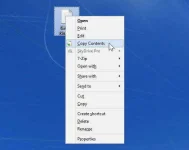
The program is specifically designed for things that you can quickly access without having to open the desired file. The installation of this program is very quick and easy, and after installation, a new option will be added to the right-clicking mouse menu, which you can have the content of your item file on the clipboard by clicking on it.
FEATURES:
– Support for text and photos
– Compatibility with JPG, PNG, PCX, BMP, TGA, FIG, TIF format in pictures
– Ability to insert full text file content into clipboard
– Quick and easy installation
Say you want to copy some text from a TXT file to a DOCX document. Here’s how things go without Copy Contents by you side: open the TXT file, select and copy the text, open the DOCX document, paste the text. And here’s how things go with Copy Contents by your side: right click the TXT file and select Copy Contents, open the DOCX document and paste the text.
Copy Contents does precisely that: it copies the contents of plain text and image files. Right click a TXT file and you’ll be able to copy its contents.
Pros
It is incredibly easy to install Copy Contents on a Windows PC. Copy Contents integrates with the right click context menu. Copy Contents provides support for plain text and image files (TXT, JPG, PCX, PNG, BMP, TGA, GIF and TIF). Copy Contents is free software.
click here
NOTE: All the software i posts belongs to the respected owners and not me. I am not the owner of any software i shared. Thank you.
FEATURES:
– Support for text and photos
– Compatibility with JPG, PNG, PCX, BMP, TGA, FIG, TIF format in pictures
– Ability to insert full text file content into clipboard
– Quick and easy installation
Say you want to copy some text from a TXT file to a DOCX document. Here’s how things go without Copy Contents by you side: open the TXT file, select and copy the text, open the DOCX document, paste the text. And here’s how things go with Copy Contents by your side: right click the TXT file and select Copy Contents, open the DOCX document and paste the text.
Copy Contents does precisely that: it copies the contents of plain text and image files. Right click a TXT file and you’ll be able to copy its contents.
Pros
It is incredibly easy to install Copy Contents on a Windows PC. Copy Contents integrates with the right click context menu. Copy Contents provides support for plain text and image files (TXT, JPG, PCX, PNG, BMP, TGA, GIF and TIF). Copy Contents is free software.
click here
Spoiler contents are visible only to Established Members.
Spoiler contents are visible only to Established Members.
Spoiler contents are visible only to Established Members.
Spoiler contents are visible only to Established Members.
NOTE: All the software i posts belongs to the respected owners and not me. I am not the owner of any software i shared. Thank you.