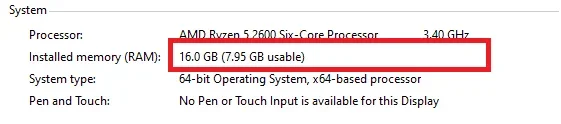
A A - KI Elite Oct 24, 2020 #1 Pano po i fix to? 8gb na lng yung usable ng RAM ko. panu po i 16GB ulit
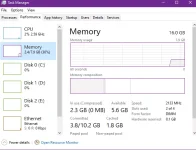
P PHC-LJ Forum Veteran Oct 24, 2020 #2 check mo sa task manager kung 16gb ram ung working Upvote 0 Downvote
K kje999 Elite Oct 24, 2020 #3 turn off your computer, unplug the power source from the outlet. Remove, clean it with eraser and plug in back your RAM Stick. Upvote 0 Downvote
turn off your computer, unplug the power source from the outlet. Remove, clean it with eraser and plug in back your RAM Stick.
TS TS A A - KI Elite Oct 24, 2020 #4 Read namn yung Memory kaso 8gb lng nababasa my Videocard namn ako Upvote 0 Downvote
H Hapahopi Forum Veteran Oct 24, 2020 #6 Pareho ba specs ng RAM mo? Try mo i-swap kung hindi naman soldered yung isang RAM. Upvote 0 Downvote
I ICE Coffee ⭐⭐☕⭐⭐ Oct 24, 2020 #8 try mo ito Click Start or Run Command, type msconfig in the Search programs and files box, and then click msconfig in the Programs list. In the System Configuration window, click Advanced options on the Boot tab. Click Advance options uncheck the Maximum memory check box, and then click OK. Restart the computer. Upvote 0 Downvote
try mo ito Click Start or Run Command, type msconfig in the Search programs and files box, and then click msconfig in the Programs list. In the System Configuration window, click Advanced options on the Boot tab. Click Advance options uncheck the Maximum memory check box, and then click OK. Restart the computer.