PH
PHProgressive web apps, or PWAs, aim to bridge the gap between websites and native applications on both mobile and desktop devices using a series of emerging web standards. Push notifications are a popular example of one such standard. We're expanding our support for these standards by making PHCorner install-able, implementing more graceful offline handling, and adding support for the badging API (which allows the app to indicate unread messages or alerts directly on its icon).
What do PWAs look like?
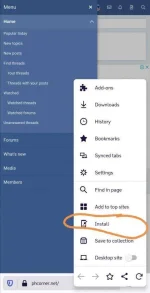
When browsing with Chrome on desktop or Android, the app can be installed via the address bar on both mobile and desktop devices.
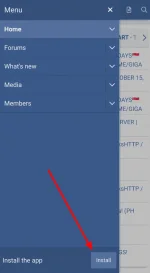
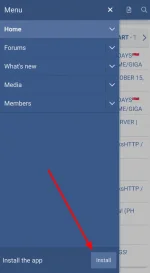
On supported mobile devices, we also display a conspicuous yet unobtrusive banner in the off-canvas menu.
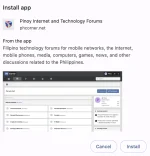
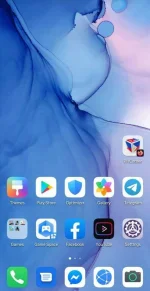
Once the app is installed, it is readily available in exactly the same way as a native app. On mobile devices, that means it can be opened via an icon on the home screen. On desktop devices, it can be opened by searching your system or even pinning the app to your taskbar or dock.
Some devices will display a splash screen while the app is being loaded.
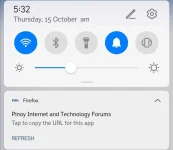
For most devices, we set the app to display a minimal interface. The elements of this interface also vary by browser, but most importantly include navigation controls. For Android devices running Chrome, we are able to use the native pull-to-refresh and back-button navigation controls, so we do without any additional interface.
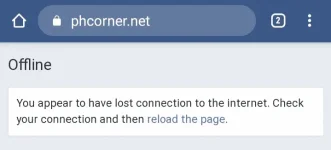
If a user tries to open or navigate the app without a proper network connection, we display a simple offline message.
What do PWAs look like?
When browsing with Chrome on desktop or Android, the app can be installed via the address bar on both mobile and desktop devices.
On supported mobile devices, we also display a conspicuous yet unobtrusive banner in the off-canvas menu.
Once the app is installed, it is readily available in exactly the same way as a native app. On mobile devices, that means it can be opened via an icon on the home screen. On desktop devices, it can be opened by searching your system or even pinning the app to your taskbar or dock.
Some devices will display a splash screen while the app is being loaded.
For most devices, we set the app to display a minimal interface. The elements of this interface also vary by browser, but most importantly include navigation controls. For Android devices running Chrome, we are able to use the native pull-to-refresh and back-button navigation controls, so we do without any additional interface.
If a user tries to open or navigate the app without a proper network connection, we display a simple offline message.