IDM Problem

  • Thread starter Thread starter PurpleFox
  • Start date Start date
  • Tags Tags
    idm
Status
Not open for further replies.
P

PurpleFox

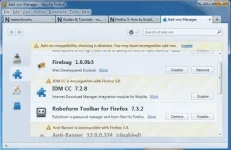
pahelp naman po, ayaw kasi gumana ng IDM sa Google Chrome at Mozilla Firefox ko... 4days na yata naging ganito :dead:

I tried to reinstall it pero ganun pa din :banghead:
latest version din ung gamit ko na IDM :(

bPHXpux.webp

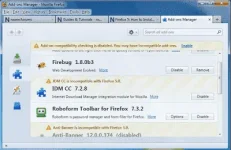
ENABLE naman ung extension pero inactive sa browser :(

pd8rco8.webp
dfEVUUE.webp

:dead:​
 
hanap ka sa youtube ng tutorials parpol or
IDM is not working in firefox - Solved

If you are using old version of Internet Download Manager plugin in New version of Firefox, IDM may or may not work properly. To fix this follow these simple steps.....

48280889936159224489.webp

Solution:

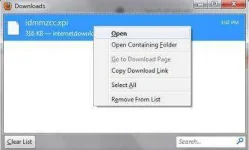
1] Open your Firefox browser and download You do not have permission to view the full content of this post. Log in or register now. file.

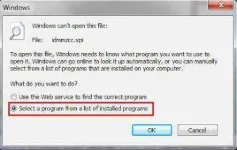
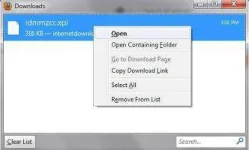
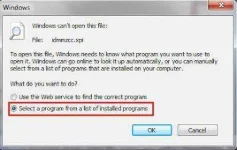
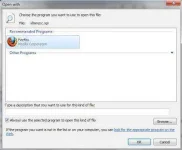
2] Now open this file using your Firefox browser.

file2.webp

file3.webp

file4.webp

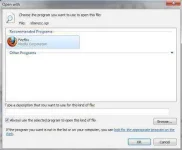
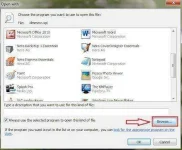
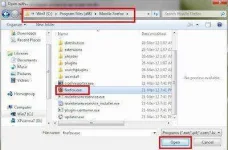
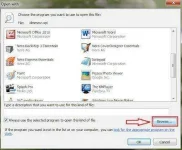
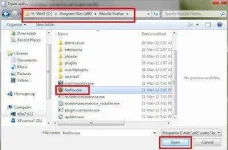
Note: If Firefox is not listed in open with box, click Browse button and go to C:\Program files\Mozilla firefoxand select Firefox.exe file.

file5.webp

file6.webp

3] Now the Install Add-ons popup dialogue box appears within few seconds and click Ok to install the IDM CCAdd-on plugin.

4] After the installation is complete, Restart the Firefox.
 
hanap ka sa yôutubê ng tutorials parpol or
IDM is not working in firefox - Solved

If you are using old version of Internet Download Manager plugin in New version of Firefox, IDM may or may not work properly. To fix this follow these simple steps.....

48280889936159224489.webp

Solution:

1] Open your Firefox browser and download You do not have permission to view the full content of this post. Log in or register now. file.

2] Now open this file using your Firefox browser.

file2.webp

file3.webp

file4.webp

Note: If Firefox is not listed in open with box, click Browse button and go to C:\Program files\Mozilla firefoxand select Firefox.exe file.

file5.webp

file6.webp

3] Now the Install Add-ons popup dialogue box appears within few seconds and click Ok to install the IDM CCAdd-on plugin.

4] After the installation is complete, Restart the Firefox.
wala din nangyari :dead: :cry:
 
Internet Download Manager not working on Firefox 4, Firefox 5, and later? Here’s the solution!
RECOMMENDED: You do not have permission to view the full content of this post. Log in or register now.
By this time most of us have updated our Firefox browser to the latest release. The latest Firefox version is quite efficient and works without a glitch. Most of the programs work perfectly well without any integration problems. But if you are using Internet Download Manager (IDM) for download purpose and you have a Firefox 5 or Firefox 4 browser, then you might have faced integration problems with the browser and the download manager.

Well I just found out the solution for it!

Internet Download Manager not working on Firefox
Here’s what you have to do:

  • Head over to Firefox add-ons page and download Flashgot Add-on for Firefox( Compatible with the latest release).
  • After installing the add-on, restart the browser.
  • Go to Tools>FlashGot>More Options>General Tab.


You do not have permission to view the full content of this post. Log in or register now.


  • If IDM is already installed on the computer, it automatically gets selected, if not browse on the general tab and locate IDM.
  • Next, select the “Auto Start Download” option.


You do not have permission to view the full content of this post. Log in or register now.


That’s pretty much it! You can now download stuff using IDM, fully integrated with the Firefox 5 or Firefox 4 browser.
 
Status
Not open for further replies.

Similar threads

About this Thread

  • 10
    Replies
  • 1K
    Views
  • 2
    Participants
Last reply from:
derx

Trending Topics

Online now

Members online
528
Guests online
837
Total visitors
1,365

Forum statistics

Threads
2,272,666
Posts
28,944,457
Members
1,237,332
Latest member
poorjason
Back
Top