 PH
PH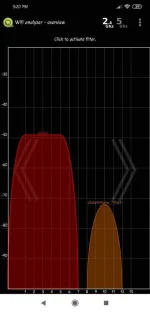
Para sa mga tulad kong nakaka-Expirience ng Lag sa Laro or Lag sa Video Streaming (ex. fb live games )
nahanap ko tong App para malaman if yung Channel kung saan tayo connected ay congested or maraming gumagamit sa line na yun
dito sa app na to kailangan naka-Open yung Location / GPS ng cp mo for scanning
at ayan nga sa screen shot ko makikita nio yung CHANNEL 13 is available. lilipat kayo ngayon jan
1.) Open Browser & type 192.168.1.1 ( or kung ano Gateway IP ng Modem nio )
2.) Fil-Up Username & Password
3.) Go to network click or tap Channel ( usually naka AUTO yan)
4.) then click channel 13. ( dipende kung anong channel maiscan nio na hindi occupied line graph)
5.) click / tap APPLY . yan na tried and tested ko yan walang Ads
You do not have permission to view the full content of this post. Log in or register now.
Youre Welcome,