 PH
PHmarcoramiro01
Honorary Poster
Control device with MULTITOUCH and MULTITASK gestures similar to iPad. Works in all applications. You can even hide status bar and enjoy full screen in your favorite games or while browsing.
"For those who tend to get tired of Android's status bar or just want more intuitive gesture-based controls on their tablet this app is definitely worth a shot." - Android Police
★ Android 8.1 (Oreo) supported
★ Requires root access
★ Multitouch
★ Multitask - start any application shortcut or custom action without leaving current application
★ Custom actions - LaunchPad Start application Previous Application Next application Home Kill current application Back Forward Recent application list Recent application dialog Menu Notification Panel Hide/Show status bar Start launcher shortcut(bookmark contacts settings etc) Start Tasker task Pause gestures Exit Screen Off (lock) Alt+Tab Music Play/Next/Previous Volume Search Voice Search Select Input Method.
★ Swipe 4 fingers right - open previous application
★ Swipe 4 fingers left - open next application
★ Expand 4 fingers - LaunchPad (dialog with your applications shortcuts and custom actions)
★ Pinch 4 fingers - Home gesture
★ Swipe 3 fingers down - Back gesture
★ Swipe 3 fingers up - Bottom recent applications bar
★ Swipe 4 fingers up - Hide/Show status bar (experimental)
★ Custom gestures - create your own gestures to start any application shortcut or custom action
Take Note: if after few hours biglang hindi gumana yung app. I suggest convert nyo as system app. Sa'kin kasi converted ko siya as system app and it works fine on my Asus Max Pro M1 Android 9. Try nyo na guys. The best app ito para sa mga rooted phones dyan. Madadagdagan pa space ng phone screen nyo.
You do not have permission to view the full content of this post. Log in or register now.
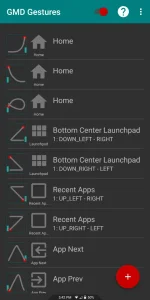
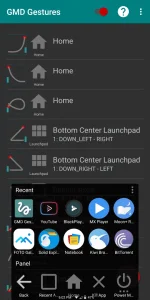
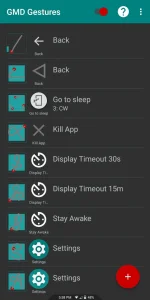
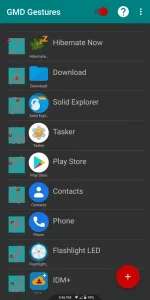
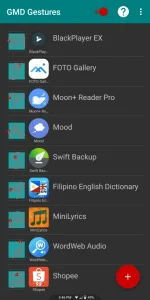
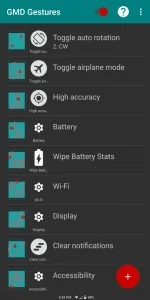
Ito po sample ng mga custom gestures ko. Nasa sa inyo na kung anong gestures ang gusto nyo.
"For those who tend to get tired of Android's status bar or just want more intuitive gesture-based controls on their tablet this app is definitely worth a shot." - Android Police
★ Android 8.1 (Oreo) supported
★ Requires root access
★ Multitouch
★ Multitask - start any application shortcut or custom action without leaving current application
★ Custom actions - LaunchPad Start application Previous Application Next application Home Kill current application Back Forward Recent application list Recent application dialog Menu Notification Panel Hide/Show status bar Start launcher shortcut(bookmark contacts settings etc) Start Tasker task Pause gestures Exit Screen Off (lock) Alt+Tab Music Play/Next/Previous Volume Search Voice Search Select Input Method.
★ Swipe 4 fingers right - open previous application
★ Swipe 4 fingers left - open next application
★ Expand 4 fingers - LaunchPad (dialog with your applications shortcuts and custom actions)
★ Pinch 4 fingers - Home gesture
★ Swipe 3 fingers down - Back gesture
★ Swipe 3 fingers up - Bottom recent applications bar
★ Swipe 4 fingers up - Hide/Show status bar (experimental)
★ Custom gestures - create your own gestures to start any application shortcut or custom action
Take Note: if after few hours biglang hindi gumana yung app. I suggest convert nyo as system app. Sa'kin kasi converted ko siya as system app and it works fine on my Asus Max Pro M1 Android 9. Try nyo na guys. The best app ito para sa mga rooted phones dyan. Madadagdagan pa space ng phone screen nyo.
You do not have permission to view the full content of this post. Log in or register now.
Ito po sample ng mga custom gestures ko. Nasa sa inyo na kung anong gestures ang gusto nyo.