PH
PHalfrancis119
Journeyman
This will help people share internet from cp VPN connection as we know it cannot be shared by the typical hotspot so I made a thread
Step 1. Go to You do not have permission to view the full content of this post. Log in or register now.
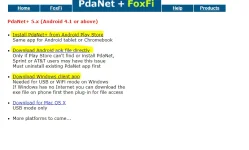
Step2. Download both android and windows client app

Step 3. Install android app first (important)
Step 4. Install windows client app
Step 5. It will prompt the user to plug the usb cable to pc and phone to install drivers
all done!
you need to enable usb debugging if prompted
To use:
1. Enable usb mode from cellphone
2. Once pc detects click the notification or just open pda net then connect usb
Feedback po so I can help too!
Step 1. Go to You do not have permission to view the full content of this post. Log in or register now.
Step2. Download both android and windows client app
Step 3. Install android app first (important)
Step 4. Install windows client app
Step 5. It will prompt the user to plug the usb cable to pc and phone to install drivers
all done!
you need to enable usb debugging if prompted
To use:
1. Enable usb mode from cellphone
2. Once pc detects click the notification or just open pda net then connect usb
Feedback po so I can help too!
Step 1. Go to You do not have permission to view the full content of this post. Log in or register now.
Step2. Download both android and windows client app
Step 3. Install android app first (important)
Step 4. Install windows client app
Step 5. It will prompt the user to plug the usb cable to pc and phone to install drivers
all done!
you need to enable usb debugging if prompted
To use:
1. Enable usb mode from cellphone
2. Once pc detects click the notification or just open pda net then connect usb
Feedback po so I can help too!
Step 1. Go to You do not have permission to view the full content of this post. Log in or register now.
Step2. Download both android and windows client app
Step 3. Install android app first (important)
Step 4. Install windows client app
Step 5. It will prompt the user to plug the usb cable to pc and phone to install drivers
all done!
you need to enable usb debugging if prompted
To use:
1. Enable usb mode from cellphone
2. Once pc detects click the notification or just open pda net then connect usb
Feedback po so I can help too!