 PH
PHLODIxyruss
Honorary Poster
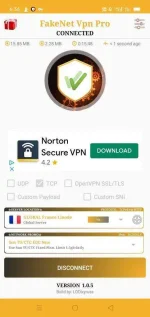
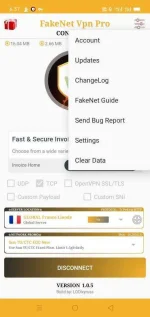
FakeNet VPN Pro FreeNet Provider
Featuring UDP, TCP & OpenVPN SSL/TLS Service.
• With High Speed dedicated server.
• Simple and Clean UI
• Light App up to 4mb
• Anti Torrent App
• Support Add Server in your own
• Support Custom Payload (HTTP/TCP)
• Support Custom SNI (OpenVPN SSL/TLS)
VPN Service:
 GOOD FOR:
 GAMING
 DOWNLOADING
 STREAMING / Netflix (use global udp)
unlimited of surfing
Good for all sites like...
Facebook
YouTube
Google
Vedio Call
Voice Call
Pang Online Class ninyo.. 
Many more...
What's new:
 Added 70+ Real IP Server (Not Clone)
Added DO Server
Added Linode Server
Added Azure Server
Added more UDP servers
Added PH Servers (UDP only)
App Version v8
Config Version v3
Support all network / promo
How to use:
 Easy Tap to Connect
1: After Install the VPN ( UPDATE )
2: Select Your Server Desire
3: Select Your Connection Desire UDP, TCP or OpenVPN SSL TLS
4: Select Your Proper Network Promo (Payload) Then (CONNECT) Tap the CONNECT BUTTON, hold on until its connected. 
Reminders:
After Downloading this app from PlayStore the config will be automatically popup (require strong data or internet connection).
Download Link
You do not have permission to view the full content of this post. Log in or register now.
Note:
This VPN content Ads.
Pop up ads, help our server maintain its stability. The ads earn will be use for server purposes. Happy Surfing
Comment or Feedback is a must.
Featuring UDP, TCP & OpenVPN SSL/TLS Service.
• With High Speed dedicated server.
• Simple and Clean UI
• Light App up to 4mb
• Anti Torrent App
• Support Add Server in your own
• Support Custom Payload (HTTP/TCP)
• Support Custom SNI (OpenVPN SSL/TLS)
VPN Service:
GOOD FOR:GAMINGDOWNLOADINGSTREAMING / Netflix (use global udp) unlimited of surfing Good for all sites like... Facebook YouTube Google Vedio Call Voice Call Pang Online Class ninyo.. Many more...What's new:
Added 70+ Real IP Server (Not Clone) Added DO Server Added Linode Server Added Azure Server Added more UDP servers Added PH Servers (UDP only) App Version v8 Config Version v3 Support all network / promoHow to use:
Easy Tap to Connect1: After Install the VPN ( UPDATE )2: Select Your Server Desire3: Select Your Connection Desire UDP, TCP or OpenVPN SSL TLS4: Select Your Proper Network Promo (Payload) Then (CONNECT) Tap the CONNECT BUTTON, hold on until its connected. Reminders:
After Downloading this app from PlayStore the config will be automatically popup (require strong data or internet connection).
Download Link
You do not have permission to view the full content of this post. Log in or register now.
Note:
This VPN content Ads.
Pop up ads, help our server maintain its stability. The ads earn will be use for server purposes. Happy Surfing
Comment or Feedback is a must.
