PH
PHDownload YouTube Vanced APK [NON-ROOT]
YouTube Vanced
YouTube Vanced is a popular modded version of YouTube. It adds a number of features to the official YouTube app, including built-in adblocking, background playback, black/dark themes, and much more. This page has installation instructions and download links for non-rooted devices.
How to install with Vanced Manager
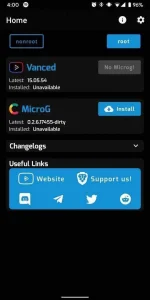
The YouTube Vanced team has created a new, easier method for getting Vanced up and running. Users can now simply install the Vanced Manager app and it will facilitate the process of installing MicroG and YouTube Vanced. The app makes it easy to choose which theme you want and to install future updates.
1. Download the latest Vanced Manager from here on your Android phone
Install the app and open it (make sure “nonroot” is selected at the top of the screen)
2. Tap “Install” next to MicroG
Follow the instructions to allow installing from unknown apps
MicroG will download and then you’ll tap “Install” when it’s ready
3. Next, tap “Install” next to Vanced
Select your preferred theme and tap “NEXT”
Select your preferred language and tap “FINISH”
Vanced will download and you’ll tap “Install” when it’s ready
Success!
Download link: You do not have permission to view the full content of this post. Log in or register now.
Enjoy .
.
YouTube Vanced
YouTube Vanced is a popular modded version of YouTube. It adds a number of features to the official YouTube app, including built-in adblocking, background playback, black/dark themes, and much more. This page has installation instructions and download links for non-rooted devices.
How to install with Vanced Manager
The YouTube Vanced team has created a new, easier method for getting Vanced up and running. Users can now simply install the Vanced Manager app and it will facilitate the process of installing MicroG and YouTube Vanced. The app makes it easy to choose which theme you want and to install future updates.
1. Download the latest Vanced Manager from here on your Android phone
Install the app and open it (make sure “nonroot” is selected at the top of the screen)
2. Tap “Install” next to MicroG
Follow the instructions to allow installing from unknown apps
MicroG will download and then you’ll tap “Install” when it’s ready
3. Next, tap “Install” next to Vanced
Select your preferred theme and tap “NEXT”
Select your preferred language and tap “FINISH”
Vanced will download and you’ll tap “Install” when it’s ready
Success!
Download link: You do not have permission to view the full content of this post. Log in or register now.
Enjoy
.