PH
PHmga ka PH! Good day sa ating lahat. Ngayon matuto naman tayo pano paganahin ang script bot ni master newbie gamit ang pc.
sa mga hindi naka aalam, mas madali siyang gawin sa pc kesa phone.
TUTORIAL 1 : Requirements
cmd (Administrator)
Telegram Account
Clean Folder
Note pad
Internet Connection
Digital Wallet [BTC, BCH, DOGE, LTC, ZEC]
TUTORIAL 2 : Setup, Editing and Add Account
2.1 Download ang script bot ni boss eymaster.
Search this thread
➡Telegram Farming multi-account (nonstop script)
2.2.1 I-extract na i-download telegramBotv3.zip.
2.2.2 Open telegramBotv3 folder. 1st nating edit ang wd.json.
2.2.3 Open ang wd.json na file using Note Pad. I-edit/replace at ilagay ang iyong digital wallet sa loob "address here".
ex. 2.a
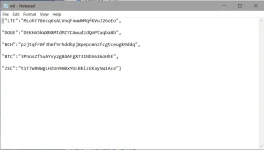
2.2.4 [OPTIONAL] Open ang auto.json para ma-edit:
chats [on/off], wd [on/off], leave[on/off], message[on/off], join[on/off], visit[on/off], time_interval [1=1hour, 4=4hours], custom text.
ex. 2.b
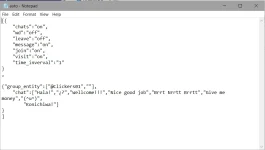
After natin ma edit ang wd.json at auto.json.
2.3 Open Telegram/Telegram x and register your sim number. may ibibigay na verification code si telegram sayo via text.
WARNING!!! maximize ang inyong pag register sa capacity ng phone niyo.
single sim slot phone = 1 sim
dual sim slot phone = 2 sim
or else magagaya kayo sakin. 30 sims ang naging sacrificial lamb ko. hahahaha. 4 palang nag work.
my theory is cooldown = 1 day.
update ko kayo sa mga susunod. may natitira pa akong 40 sims.
2.4 [Skip kung naka join] Once na nakapag register kana, join ka sa mga channel sa baba:
click > You do not have permission to view the full content of this post. Log in or register now.
You do not have permission to view the full content of this post. Log in or register now.
You do not have permission to view the full content of this post. Log in or register now.
You do not have permission to view the full content of this post. Log in or register now.
You do not have permission to view the full content of this post. Log in or register now.
You do not have permission to view the full content of this post. Log in or register now.
press Start.
TUTORIAL 3 : installing python and pip
3.1.a Using search bar, type cmd(Command Prompt) right click and run as administrator.
3.1.b Press window key+r, type cmd(Command Prompt). Press ctrl+shift+enter.
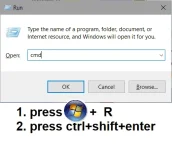
(New User)
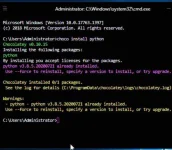
3.2 After ma buksan ang cmd(Administrator). type python.
note: kung wala ka pang python, si windows ay automatic kang i-direct sa store. at pindutin ang install.
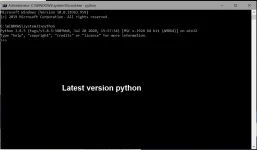
3.3 After ma download ni python . I-type pip install telethon
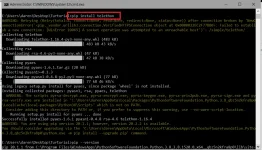
3.4 After ma download ni pip install telethon. I-type pip install requests
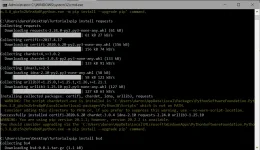
3.4 After ma download ni pip install requests. I-type pip install bs4
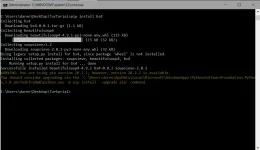
[Dito ka na lagi mag start kada-open mo ng cmd]
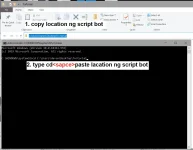
3.5.1 Pumunta sa location ng script bot Folder at i-copy ang location
3.5.2 Sa cmd i-type cd<space>paste ang locationg script bot.
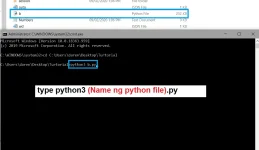
3.6 Type python3 scriptBotv3.py.
TUTORIAL 4 : FINAL
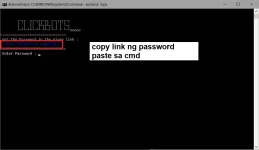
4.1 bago maka pasok sa main menu mang hihingi muna ng password ang script. i-copy ang link.
4.2 Open Opera browser[Recomended], paste ang link. Skip ads, hintay lumabas ang password [pastebin].
salamat kay opera, ma-bypass niya ang annoying ads ni bubuyog.
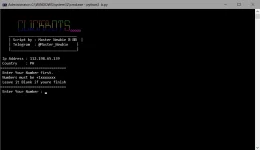
4.3 After mo ma-enter ang password mapupunta kana sa main menu. [new user] need mong mag add ng number na registered sa telegram.
4.4 type 1, para makapag start na mag farm. [new user] bago makapag farm. manghihingi ulit ng code ang bot. i-check ang iyong telegram.
4.5 mamili ng currency.
4.6 End. mag hintay ka na ng sweldo mo.
sa mga hindi naka aalam, mas madali siyang gawin sa pc kesa phone.
TUTORIAL 1 : Requirements
cmd (Administrator)
Telegram Account
Clean Folder
Note pad
Internet Connection
Digital Wallet [BTC, BCH, DOGE, LTC, ZEC]
TUTORIAL 2 : Setup, Editing and Add Account
2.1 Download ang script bot ni boss eymaster.
Search this thread
➡Telegram Farming multi-account (nonstop script)
2.2.1 I-extract na i-download telegramBotv3.zip.
2.2.2 Open telegramBotv3 folder. 1st nating edit ang wd.json.
2.2.3 Open ang wd.json na file using Note Pad. I-edit/replace at ilagay ang iyong digital wallet sa loob "address here".
ex. 2.a
2.2.4 [OPTIONAL] Open ang auto.json para ma-edit:
chats [on/off], wd [on/off], leave[on/off], message[on/off], join[on/off], visit[on/off], time_interval [1=1hour, 4=4hours], custom text.
ex. 2.b
After natin ma edit ang wd.json at auto.json.
2.3 Open Telegram/Telegram x and register your sim number. may ibibigay na verification code si telegram sayo via text.
WARNING!!! maximize ang inyong pag register sa capacity ng phone niyo.
single sim slot phone = 1 sim
dual sim slot phone = 2 sim
or else magagaya kayo sakin. 30 sims ang naging sacrificial lamb ko. hahahaha. 4 palang nag work.
my theory is cooldown = 1 day.
update ko kayo sa mga susunod. may natitira pa akong 40 sims.
2.4 [Skip kung naka join] Once na nakapag register kana, join ka sa mga channel sa baba:
click > You do not have permission to view the full content of this post. Log in or register now.
You do not have permission to view the full content of this post. Log in or register now.
You do not have permission to view the full content of this post. Log in or register now.
You do not have permission to view the full content of this post. Log in or register now.
You do not have permission to view the full content of this post. Log in or register now.
You do not have permission to view the full content of this post. Log in or register now.
press Start.
TUTORIAL 3 : installing python and pip
["Skwel, post: 16360781, member: 490530"]
Fix ko na lods try nyo munang e verify ung python nyo. FOR WINDOWS 10
source:
You do not have permission to view the full content of this post. Log in or register now.
3.1.a Using search bar, type cmd(Command Prompt) right click and run as administrator.
3.1.b Press window key+r, type cmd(Command Prompt). Press ctrl+shift+enter.
(New User)
3.2 After ma buksan ang cmd(Administrator). type python.
note: kung wala ka pang python, si windows ay automatic kang i-direct sa store. at pindutin ang install.
3.3 After ma download ni python . I-type pip install telethon
3.4 After ma download ni pip install telethon. I-type pip install requests
3.4 After ma download ni pip install requests. I-type pip install bs4
[Dito ka na lagi mag start kada-open mo ng cmd]
3.5.1 Pumunta sa location ng script bot Folder at i-copy ang location
3.5.2 Sa cmd i-type cd<space>paste ang locationg script bot.
3.6 Type python3 scriptBotv3.py.
TUTORIAL 4 : FINAL
4.1 bago maka pasok sa main menu mang hihingi muna ng password ang script. i-copy ang link.
4.2 Open Opera browser[Recomended], paste ang link. Skip ads, hintay lumabas ang password [pastebin].
salamat kay opera, ma-bypass niya ang annoying ads ni bubuyog.
4.3 After mo ma-enter ang password mapupunta kana sa main menu. [new user] need mong mag add ng number na registered sa telegram.
4.4 type 1, para makapag start na mag farm. [new user] bago makapag farm. manghihingi ulit ng code ang bot. i-check ang iyong telegram.
4.5 mamili ng currency.
4.6 End. mag hintay ka na ng sweldo mo.