🔒 Closed windows 10 install help

Status
Not open for further replies.

Megabing213

Eternal Poster
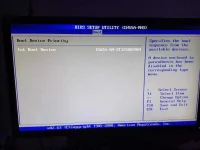
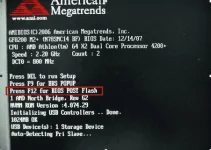
pahelp naman po kung pano mapunta sa bios menu tulad lang nung sa mga laptop. iba kasi na tackle ko e sa computer sya di ko alam kung ano pipindutin. gusto kolang mag install nang windows 10
ano po jan sa tatlo? then ano next proccess? please need help talaga.
1598772604926.webp
 
1. Press DEL
2. Go to Boot
3. Select Boot Device Priority
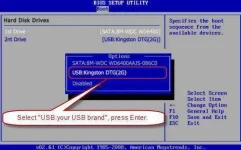
4. Change the 1st Boot Device to your installation device (if cd/flash drive)
5. Go to Exit, then select Exit Saving Changes or just press F10 for shortcut.

Then after mag restart mag boboot na yan dun sa naselect mo na boot device and mag poproceed na yan dun sa windows installation.
 
thanks for helping. but sir yung pag kapunta ko dun sa boot. sir wala akong nakitang naka line up na 1st,2nd,3rd diko man nakita yung mga usb drive or boot manager. ano kayang prob nun sir
 
[XX='Megabing213, c: 233723, m: 1113877'][/XX] pa tingin nga ako lods para mas malinaw picturan mo, kasi yung picture sa post mo may na detect naman na 1 storage device.
 
Status
Not open for further replies.

Similar threads

About this Thread

  • 27
    Replies
  • 665
    Views
  • 8
    Participants
Last reply from:
Unknown user

Trending Topics

Online now

Members online
970
Guests online
2,846
Total visitors
3,816

Forum statistics

Threads
2,276,141
Posts
28,967,846
Members
1,231,131
Latest member
Yrrojan
Back
Top