 PH
PH-
Welcome to PHCorner Forums! Sign up for free to unlock full access and exclusive privileges, including:
- Asking questions about computer and mobile issues
- Discovering internet tips for your mobile network and computer
You are using an out of date browser. It may not display this or other websites correctly.
You should upgrade or use an alternative browser.
You should upgrade or use an alternative browser.
❓ Help Homesurf 199
- Thread starter weebros
- Start date
- Status
- Not open for further replies.

PHC-Hershey
Forum Expert
any vpn na pwede gawan ng config at nalalagyan ng payload, like Http Injector or OpenVPN
wakeupsleepyhead
Leecher
ovpn lang po kasi pwde ko magamit po sa iphone ubos na po open data online class pa namn namin bukasany vpn na pwede gawan ng config at nalalagyan ng payload, like Http Injector or OpenVPN

PHC-Hershey
Forum Expert
I suggest use homewatch199, mas malaki ng konti ang data allocation nun compare sa homesurf pero pang yt/netflix etc, dyan papasok yung openvpn mo, magagamit mo yung 4gb everyday nya pang yt at netflix sa online class mo, config for sns+wnp lang kailangan mo, marunong ka ba gumawa ng config sa openvpn ?
wakeupsleepyhead
Leecher
homewatch 199 po ang gamit ko ngayon, di pa po ako marunong gumawa po eh bago lang kasi din, pwde ba gumawa ng config po sa iphone?
PHC-Hershey
Forum Expert
Yes pwede pwede po. Dapat lang may text editor ka application. Di ko alam ang specific name nyan sa iphone hanap ka lang basta parang notepad sya ng windows. I'll guide you to the process
wakeupsleepyhead
Leecher
sge po thank you  magdodownload na po ako ngayon sa text editor
magdodownload na po ako ngayon sa text editorwakeupsleepyhead
Leecher
na download ko na po ma’amYes pwede pwede po. Dapat lang may text editor ka application. Di ko alam ang specific name nyan sa iphone hanap ka lang basta parang notepad sya ng windows. I'll guide you to the process
PHC-Hershey
Forum Expert
Punta ka sa tcpvpn.com.na download ko na po ma’am
Create ka ng account dun sa sggs server.
wakeupsleepyhead
Leecher
okay na poPunta ka sa tcpvpn.com.
Create ka ng account dun sa sggs server.
wakeupsleepyhead
Leecher
[XX='PHC-Hershey, c: 238768, m: 936846'][/XX] done na po ma’am
PHC-Hershey
Forum Expert
@PHC-Hershey..done na po ma’am
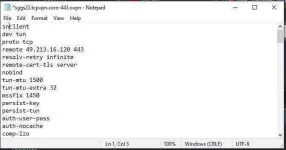
Now, open your config to text editor, you will see something like this
@ATTACH..type="full" width="414px"]947007[/ATTACH]
look for the word verb 3 and under that paste these codes
@CODE..dhcp-option DNS 1.1.1.1
dhcp-option DNS 1.0.0.1
http-proxy @put your proxy ip here..http-proxy-timeout 3
http-proxy-option CUSTOM-HEADER CONNECT HTTP/1.1
http-proxy-option CUSTOM-HEADER Host clients3.google.com
http-proxy-option CUSTOM-HEADER @-Online-Host clients...google.com
http-proxy-option CUSTOM-HEADER @-Forward-Host clients...google.com
http-proxy-option CUSTOM-HEADER Connection Keep-Alive[/CODE]
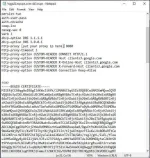
it will look like this
@ATTACH..type="full" width="380px"]947017[/ATTACH]
now look for the line
@CODE..remote 49.213.16.120 443[/CODE]
copy the Ip address, here in my example, the IP adress is 49.213.16.120
now look again for this line
@CODE..http-proxy @put your proxy ip here..CODE]
replace the phrase "@put your proxy ip here.." with the IP address you just copied.
that line will now look like this
@CODE..http-proxy 49.213.16.130 8080[/CODE]
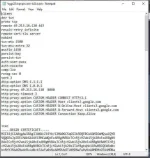
now your final config will look like this
@ATTACH..type="full" width="307px"]947021[/ATTACH]
now save it, make sure that the file extension is .ovpn
Attachments
wakeupsleepyhead
Leecher
sobrang thank you po ma’am laking tulong po nito Godbless sa inyo and take care always thank youNow, open your config to text editor, you will see something like this
View attachment 947007
look for the word verb 3 and under that paste these codes
Code:dhcp-option DNS 1.1.1.1 dhcp-option DNS 1.0.0.1 http-proxy [put your proxy ip here] 8080 http-proxy-timeout 3 http-proxy-option CUSTOM-HEADER CONNECT HTTP/1.1 http-proxy-option CUSTOM-HEADER Host clients3.google.com http-proxy-option CUSTOM-HEADER X-Online-Host clients3.google.com http-proxy-option CUSTOM-HEADER X-Forward-Host clients3.google.com http-proxy-option CUSTOM-HEADER Connection Keep-Alive
it will look like this
View attachment 947017
now look for the line
Code:remote 49.213.16.120 443
copy the Ip address, here in my example, the IP adress is 49.213.16.120
now look again for this line
Code:http-proxy [put your proxy ip here] 8080
replace the phrase "[put your proxy ip here]" with the IP address you just copied.
that line will now look like this
Code:http-proxy 49.213.16.130 8080
now your final config will look like this
View attachment 947021
now save it, make sure that the file extension is .ovpn

Malaya Rocks
Enthusiast
Pasingit po .....Maam PHC-Hershey ......pwede po ba yan for pocket wifi?
- Status
- Not open for further replies.
About this Thread
-
44Replies
-
2KViews
-
13Participants
Last reply from:
pidotgalleto
pidotgalleto
New Topics
-
Free data pagnagload?
- Started by Ryuwin
- Replies: 1
- ❓ Mobile Network Discussion & Support
-
GOMO APNs Recommendation
- Started by PHC-Cmmnd
- Replies: 0
- ❓ Mobile Network Discussion & Support
-
Baka po may sms bomber po kayo
- Started by Ichi2
- Replies: 2
- ❓ Mobile Network Discussion & Support
-
Facebook ayaw ma buksan
- Started by ShaAma
- Replies: 0
- ❓ Mobile Network Discussion & Support
-
Unli tiktok parin ba ang sulit ngayon kay Globe?
- Started by Chili Mansi
- Replies: 0
- ❓ Mobile Network Discussion & Support
-
Tiktok Affiliate PH kahit nasa ibang bansa
- Started by jetpo05
- Replies: 0
- ❓ Mobile Network Discussion & Support
-
Unlidata na no cap
- Started by akotaz23
- Replies: 1
- ❓ Mobile Network Discussion & Support
-
Best unli 5g promo for modem
- Started by Deathhack
- Replies: 3
- ❓ Mobile Network Discussion & Support
Trending Topics
-
-
-
-
-
-
Postern old vpn 2017 working on piso wifi vendo machine no hulog 2027 TCP with payload
- TEAM-FREENET
Replies: 4 -
-
-
-
Online now
- Members online
- 418
- Guests online
- 11,521
- Total visitors
- 11,939