PH
PHoutsidecap
Elite
PDF Converter - Convert PDF to Word Document v3.1.2 [PRO]
Requirements: 4.2 and up
Overview: Convert files with PDF Converter to a portable document format
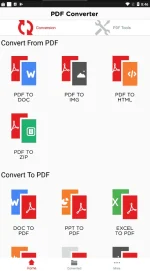
This converter is for everyone who wants to convert Word to PDF or into other formats or vice versa, without any hassle.
This handy PDF to word converter comes with multiple options to choose from. If you have a file present on your smartphone that you wish to convert, all you have to do is select the Gallery from the menu of the PDF converter and look for the file. After selecting the file, you wish to export, let the app do its magic.
PDF Converter - Convert Pdf to Word Document comes with the following Conversions, tools and features:
Conversions:
Tools:
Usage:
The PDF converter and merge PDF files is made for the people who like to share files in this secure format. This specific document type allows password protection such as lock PDF and encryption of data that carry sensitive information. The PDF file is navigable if you have multiple files present in it plus this file type is not going away any time soon because it can be encrypted in a way that no one can even take a peek into the document.
This PDF converter and merge PDF files is mostly used by graphic designers who post their excellent work online. So, people can split PDF into several files and use its content to construct images, website designs and much more.
What's New:
We always strive to provide you with the best PDF converter and update it according to your feedback.
In this update:
Advanced user-interface
Home Screen Change
new Tools and designs added
Bugs fixed
images conversion is divided into categories (image to image case)
jpg to png, png to jpg, gif to png ,gif to jpg, tif to jpg ,tiff to png
Html and Excel Conversion added
Tiff and GIF Conversion added
Tiff viewer is added in Converted Portion
☆PRO features unlocked
This app has no advertisements
More Info:
You do not have permission to view the full content of this post. Log in or register now.
Download : You do not have permission to view the full content of this post. Log in or register now.
Requirements: 4.2 and up
Overview: Convert files with PDF Converter to a portable document format
This converter is for everyone who wants to convert Word to PDF or into other formats or vice versa, without any hassle.
This handy PDF to word converter comes with multiple options to choose from. If you have a file present on your smartphone that you wish to convert, all you have to do is select the Gallery from the menu of the PDF converter and look for the file. After selecting the file, you wish to export, let the app do its magic.
PDF Converter - Convert Pdf to Word Document comes with the following Conversions, tools and features:
Conversions:
- Convert Word to PDF
- convert JPG/JPEG/photo to PDF
- convert PDF to JPG
- convert PPT to PDF
- convert PDF to Zip
- convert Word to Zip
- convert Image to Zip
- convert PPT to Zip
- convert Text to Zip
Tools:
- Lock PDF
- Unlock PDF
- Split PDF
- Merge PDF
- Waretmark PDF
- Rotate PDF
Usage:
- Choose a file from the gallery, view it, convert it with our file converter, and save it with this PDF editor and PDF to word converter
- Upload files from Dropbox and Google Drive to convert to Adobes PDF format.
- Split PDF or merge PDF files made trouble-free.
- Easily protect, lock or unlock all the PDF files.
- Photo to PDF can increase the notability of your work.
- Add watermarks anywhere in the PDF files you converted with Adobe Acrobat reader.
The PDF converter and merge PDF files is made for the people who like to share files in this secure format. This specific document type allows password protection such as lock PDF and encryption of data that carry sensitive information. The PDF file is navigable if you have multiple files present in it plus this file type is not going away any time soon because it can be encrypted in a way that no one can even take a peek into the document.
This PDF converter and merge PDF files is mostly used by graphic designers who post their excellent work online. So, people can split PDF into several files and use its content to construct images, website designs and much more.
What's New:
We always strive to provide you with the best PDF converter and update it according to your feedback.
In this update:
Advanced user-interface
Home Screen Change
new Tools and designs added
Bugs fixed
images conversion is divided into categories (image to image case)
jpg to png, png to jpg, gif to png ,gif to jpg, tif to jpg ,tiff to png
Html and Excel Conversion added
Tiff and GIF Conversion added
Tiff viewer is added in Converted Portion
☆PRO features unlocked
This app has no advertisements
More Info:
You do not have permission to view the full content of this post. Log in or register now.
Download : You do not have permission to view the full content of this post. Log in or register now.