🔒 Closed [Solved] No Load WiFi Disconnect Problem

Status
Not open for further replies.

Emperorization

Honorary Poster
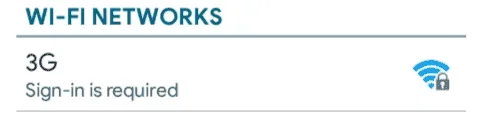
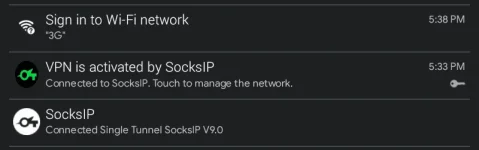
Nag di-disconnect po yung Wi-Fi connection ko after a few minutes kase walang promo (failed sa "sign-in to Wi-Fi network").
Ano po bang trick dito? Or kailangan ko mag register ng promo?
Screenshot_2020-08-21-17-36-09~01.png
Screenshot_2020-08-21-17-41-17~01.png
Screenshot_2020-08-21-17-39-50~01.png
 
Boss, alam ko na solution hehehe. Nasa XDA lang pala.
Follow mo lang to:
1- goto Settings > WiFi settings
2- long-press on Connection
3- Select "Modify network config"
4- check the "Show advanced options" tick.
5- select proxy settings to Manual
6- proxy host name , input the value from 192.168.1.1 to 192.168.1.225
7- Proxy port = input one of them "8080" , "3128" , "80"
8- press the "Save".
9- turn wifi off and the On, you will not see the message ""Sign into Wi-Fi network"
10-now repeat the steps from 1 ~ 4
11- and revert back the proxy settings to "None", its Done.
12- you will be fine with this network.
 
Solution:
1- goto Settings > WiFi settings
2- long-press on Connection
3- Select "Modify network config"
4- check the "Show advanced options" tick.
5- select proxy settings to Manual
6- proxy host name , input the value from 192.168.1.1 to 192.168.1.225
7- Proxy port = input one of them "8080" , "3128" , "80"
8- press the "Save".
9- turn wifi off and the On, you will not see the message ""Sign into Wi-Fi network"
10-now repeat the steps from 1 ~ 4
11- and revert back the proxy settings to "None", its Done.
12- you will be fine with this network.

Credits to XDA forum. Di ko nalang lalagay yung link, baka bawal hehehe. Sana makatulong
 
Solution: (Not sure if temporary or permanent fix)
1- goto Settings > WiFi settings
2- long-press on Connection
3- Select "Modify network config"
4- check the "Show advanced options" tick.
5- select proxy settings to Manual
6- proxy host name , input the value from 192.168.1.1 to 192.168.1.225
7- Proxy port = input one of them "8080" , "3128" , "80"
8- press the "Save".
9- turn wifi off and the On, you will not see the message ""Sign into Wi-Fi network"
10-now repeat the steps from 1 ~ 4
11- and revert back the proxy settings to "None", its Done.
12- you will be fine with this network.

Credits to XDA forum. Di ko nalang lalagay yung link, baka bawal hehehe. Sana makatulong
Salamat bro
 
[XX='Emperorization, c: 197263, m: 948671'][/XX] sir patulog nagawa kona to nakakonek nman sa vpn noload ng Globe nobrowse nman
 
Status
Not open for further replies.

About this Thread

  • 15
    Replies
  • 877
    Views
  • 7
    Participants
Last reply from:
zedious

Online now

Members online
1,049
Guests online
717
Total visitors
1,766

Forum statistics

Threads
2,276,975
Posts
28,973,480
Members
1,229,674
Latest member
Mjivo
Back
Top