 PH
PHPHC-Noobita
Elite
Una sa lahat check niyo muna thread ni boss smartteevee kung di niyo pa nakikita, may dinrop siyang account dito ➡ CLICK HERE
ℝ𝕦𝕝𝕖𝕤 (𝕡𝕒𝕜𝕚-𝕓𝕒𝕤𝕒 𝕞𝕦𝕟𝕒):
 Email: b97@appstoreoa.ru
PW: @Appstoreoa1
ℍ𝕠𝕨 𝕥𝕠 𝕦𝕤𝕖? (para sa mga hindi sure ang gagawin)
1. Go to Settings 🛠
2. Find iTunes & App Store
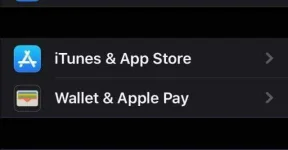
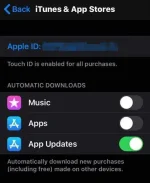
3. Sign in using the details na nasa taas, it should look like this. (wag na sigurong i-on si automatic downloads)
4. Go to the appstore and click the upper right button, yung may figure then click 'purchased'.. you should see this.
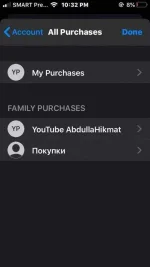
5. Explore mo yung accounts under family purchases, andun lahat ng ρáíd games/apps na pwede mo idownload.
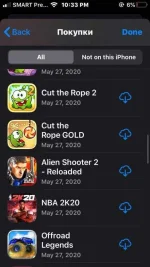
6. After ma-download, make sure na i-log out ang account!
𝔽𝕖𝕖𝕕𝕓𝕒𝕔𝕜 𝕚𝕗 𝕨𝕠𝕣𝕜𝕚𝕟𝕘 𝕒𝕟𝕕 𝕗𝕠𝕝𝕝𝕠𝕨 𝕞𝕖 𝕗𝕠𝕣 𝕞𝕠𝕣𝕖 𝕦𝕡𝕕𝕒𝕥𝕖𝕤 𝕙𝕖𝕙𝕖, 𝕝𝕒𝕤𝕥𝕝𝕪, 𝕔𝕣𝕖𝕕𝕚𝕥𝕤 𝕤𝕒 𝕠𝕨𝕟𝕖𝕣

ℝ𝕦𝕝𝕖𝕤 (𝕡𝕒𝕜𝕚-𝕓𝕒𝕤𝕒 𝕞𝕦𝕟𝕒):
- Wag galawin ang account, nakikihiram lang tayo
 (don't change name, email, password etc.)
 - Sign in lang sa itunes & app store, wag icloud! (para di ma-lock agad ang account)
- Pagkatapos ma-download ng gustong laro/app, i-log out agad.
Email: b97@appstoreoa.ruPW: @Appstoreoa1ℍ𝕠𝕨 𝕥𝕠 𝕦𝕤𝕖? (para sa mga hindi sure ang gagawin)
1. Go to Settings 🛠
2. Find iTunes & App Store
3. Sign in using the details na nasa taas, it should look like this. (wag na sigurong i-on si automatic downloads)
4. Go to the appstore and click the upper right button, yung may
figure then click 'purchased'.. you should see this.5. Explore mo yung accounts under family purchases, andun lahat ng ρáíd games/apps na pwede mo idownload.
6. After ma-download, make sure na i-log out ang account!
𝔽𝕖𝕖𝕕𝕓𝕒𝕔𝕜 𝕚𝕗 𝕨𝕠𝕣𝕜𝕚𝕟𝕘 𝕒𝕟𝕕 𝕗𝕠𝕝𝕝𝕠𝕨 𝕞𝕖 𝕗𝕠𝕣 𝕞𝕠𝕣𝕖 𝕦𝕡𝕕𝕒𝕥𝕖𝕤 𝕙𝕖𝕙𝕖, 𝕝𝕒𝕤𝕥𝕝𝕪, 𝕔𝕣𝕖𝕕𝕚𝕥𝕤 𝕤𝕒 𝕠𝕨𝕟𝕖𝕣

