PH
PHMga Ka NoLoad dyan, ito after 50 plus seconds connected then disconnected again ROFL
Adjust nyo nalang yung Task, 59 seconds OKs na OKs din!
Ewan ko na lang if di nyo mapagana yan, sa dami ng video with Tutorials pa haha
Plus customize nyo nalang mga ibang action na idadagdag nyo para mapamilyar din kayo sa app ROFL
Pang WiFi Users yung file (ng Tasker) but you can edit it pati yung sa Macrodroid at Automate, customize as you want haha
Note: For the record, yung NoLoad Kay Sun dati (lport 25/110 sa ovpn) ay di umaabot ng 1minute as average 30-45 seconds per established connection.
Kaya OKs narin si Globe kasi 1min average per connection.
Update as of August 16, 2020
Video tutorial for Macrodroid, Step by Step same sa KPN basta may "RECONNECT" button
Update as of August 18, 2020
Added Automate (.flo) para may ibang option tayo
Update as of August 22, 2020: added 3 .flo files
Pwede ito sa / Ha Tunnel
  adjust adjust lang yan
Prefer to use sockshttp kasi yun ang naka target sa Task kasi may "Reconnect" button sya sa pulldown menu (Notification Area)
Update as of August 28, 2020 added Tutorial using Automate for Http Injector enthusiasts rofl
By checking it out Here
If may setup kayo for NoLoad, mas maganda!
Main Tip / Trick:
Using si Kumpareng Tasker app or Macrodroid or Automate at AutoNotification plug in para auto "Recon" sina SocksHttp / KPN / TLS / Ha Tunnel / Http Injector
Watch for convincing proofs/evidences below (via Tasker) para wala angal
Update as of August 19, 2020, added proof for using Automate App (1st video below) and Tutorial on how to create task using Automate (See Post Number 14 below plus 3 .flo files and premium Automate ) {hanggang 5 media/videos lang pala pwede dito sa PHC}
Aralin nyo yong mga Apps, madadale nyo yan
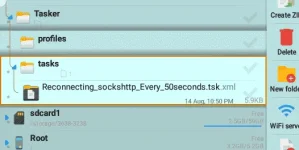
Just import one (.xml or .mdr or .flo)
(Pinakita ko yung script para may preview yung .xml at .MDR na NASA baba at ma-inspect nyo na di malicious sa phone natin if applied/run.
Just kindly download the file/attachment by importing.
Adjust nyo nalang yung Task, 59 seconds OKs na OKs din!
Ewan ko na lang if di nyo mapagana yan, sa dami ng video with Tutorials pa haha
Plus customize nyo nalang mga ibang action na idadagdag nyo para mapamilyar din kayo sa app ROFL
Pang WiFi Users yung file (ng Tasker) but you can edit it pati yung sa Macrodroid at Automate, customize as you want haha
Note: For the record, yung NoLoad Kay Sun dati (lport 25/110 sa ovpn) ay di umaabot ng 1minute as average 30-45 seconds per established connection.
Kaya OKs narin si Globe kasi 1min average per connection.
Update as of August 16, 2020
Video tutorial for Macrodroid, Step by Step same sa KPN basta may "RECONNECT" button
Update as of August 18, 2020
Added Automate (.flo) para may ibang option tayo
Update as of August 22, 2020: added 3 .flo files
Pwede ito sa
/ Ha Tunnel adjust adjust lang yanPrefer to use sockshttp kasi yun ang naka target sa Task kasi may "Reconnect" button sya sa pulldown menu (Notification Area)
Update as of August 28, 2020 added Tutorial using Automate for Http Injector
enthusiasts roflBy checking it out Here
If may setup kayo for NoLoad, mas maganda!
Main Tip / Trick:
Using si Kumpareng Tasker app or Macrodroid or Automate at AutoNotification plug in para auto "Recon" sina SocksHttp / KPN / TLS / Ha Tunnel / Http Injector
Watch for convincing proofs/evidences below (via Tasker) para wala angal
Update as of August 19, 2020, added proof for using Automate App (1st video below) and Tutorial on how to create task using Automate (See Post Number 14 below plus 3 .flo files and premium Automate ) {hanggang 5 media/videos lang pala pwede dito sa PHC}
Aralin nyo yong mga Apps, madadale nyo yan
Just import one (.xml or .mdr or .flo)
(Pinakita ko yung script para may preview yung .xml at .MDR na NASA baba at ma-inspect nyo na di malicious sa phone natin if applied/run.
Just kindly download the file/attachment by importing.
Spoiler contents are visible only to Established Members.