 PH
PHBago nakin ilatag nakin yung tutorial, credits muna sa taong gumawa ng cursor!
You do not have permission to view the full content of this post. Log in or register now.
Alright, since tapos na yan, punta na tayo sa pag install ng Hatsune Miku Cursor. Sa mga taong marunong na mag install ng cursor themes, download nyo nalang dito: You do not have permission to view the full content of this post. Log in or register now.
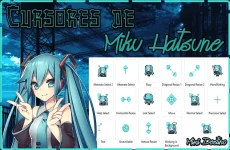
All mirror links at the bottom of the post.
1. Download the cursor pack: You do not have permission to view the full content of this post. Log in or register now.
2. Download the install file: You do not have permission to view the full content of this post. Log in or register now.
3. Exract install file. Note: ONLY EXTRACT THE INSTALL FILE ZIP!
3. Right click Install.inf then select Install
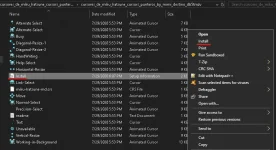
4. Search for Mouse options
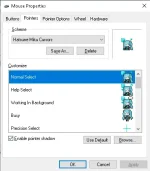
5. Open Mouse Properties then click Pointers Tab
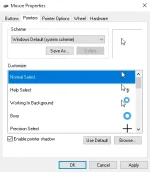
6. Click Scheme and select Hatsune Miku Cursors and click OK to exit!
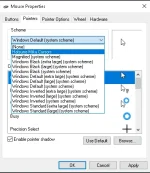
7. DONE!
Alternative Download Links DROPMB:
You do not have permission to view the full content of this post. Log in or register now.
You do not have permission to view the full content of this post. Log in or register now.
Don't want to download the install.inf file?
copy this code and save it as install.inf
You do not have permission to view the full content of this post. Log in or register now.
Alright, since tapos na yan, punta na tayo sa pag install ng Hatsune Miku Cursor. Sa mga taong marunong na mag install ng cursor themes, download nyo nalang dito: You do not have permission to view the full content of this post. Log in or register now.
All mirror links at the bottom of the post.
1. Download the cursor pack: You do not have permission to view the full content of this post. Log in or register now.
2. Download the install file: You do not have permission to view the full content of this post. Log in or register now.
3. Exract install file. Note: ONLY EXTRACT THE INSTALL FILE ZIP!
3. Right click Install.inf then select Install
4. Search for Mouse options
5. Open Mouse Properties then click Pointers Tab
6. Click Scheme and select Hatsune Miku Cursors and click OK to exit!
7. DONE!
Alternative Download Links DROPMB:
You do not have permission to view the full content of this post. Log in or register now.
You do not have permission to view the full content of this post. Log in or register now.
Don't want to download the install.inf file?
copy this code and save it as install.inf
Code:
[Version]
signature="$Chicago$"

[DefaultInstall]
CopyFiles = Scheme.Cur, Scheme.Txt
AddReg    = Scheme.Reg

[DestinationDirs]
Scheme.Cur = 10,"%CUR_DIR%"
Scheme.Txt = 10,"%CUR_DIR%"

[Scheme.Reg]
HKCU,"Control Panel\Cursors\Schemes","%SCHEME_NAME%",,"%10%\%CUR_DIR%\%pointer%,%10%\%CUR_DIR%\%help%,%10%\%CUR_DIR%\%work%,%10%\%CUR_DIR%\%busy%,%10%\%CUR_DIR%\%cross%,%10%\%CUR_DIR%\%Text%,%10%\%CUR_DIR%\%Hand%,%10%\%CUR_DIR%\%unavailiable%,%10%\%CUR_DIR%\%Vert%,%10%\%CUR_DIR%\%Horz%,%10%\%CUR_DIR%\%Dgn1%,%10%\%CUR_DIR%\%Dgn2%,%10%\%CUR_DIR%\%move%,%10%\%CUR_DIR%\%alternate%,%10%\%CUR_DIR%\%link%"

[Scheme.Cur]
Normal-Select.cur
Help-Select.cur
Working-in-Background.ani
Busy.ani
Text.cur
Unavailable.ani
Vertical-Resize.ani
Horizontal-Resize.ani
Diagonal-Resize-1.ani
Diagonal-Resize-2.ani
Move.ani
Link-Select.cur
Precision-Select.ani
HandWriting.cur
Alternate-Select.cur

[Scheme.Txt]

[Strings]
CUR_DIR       = "Hatsune-Miku-Cursors"
SCHEME_NAME   = "Hatsune Miku Cursors"
pointer       = "Normal-Select.cur"
help          = "Help-Select.cur"
work          = "Working-in-Background.ani"
busy          = "Busy.ani"
text          = "Text.cur"
unavailiable  = "Unavailable.ani"
vert          = "Vertical-Resize.ani"
horz          = "Horizontal-Resize.ani"
dgn1          = "Diagonal-Resize-1.ani"
dgn2          = "Diagonal-Resize-2.ani"
move          = "Move.ani"
link          = "Link-Select.cur"
cross         = "Precision-Select.ani"
hand          = "HandWriting.cur"
alternate     = "Alternate-Select.cur"

