 PH
PHfor many things, but it probably is best known for its ability to penetration test, or “häçk,” WPA and WPA2 networks. There are hundreds of Windows applications that claim they can häçk WPA; don’t get them! They’re just scams, used by professional häçkers, to lure newbie or wannabe häçkers into getting häçked themselves. There is only one way that häçkers get into your network, and that is with a Linux-based OS, a wireless card capable of monitor mode, and aircrack-ng or similar. Also note that, even with these tools, Wi-Fi cracking is not for beginners. Playing with it requires basic knowledge of how WPA authentication works, and moderate familiarity with Kali Linux and its tools, so any häçker who gains access to your network probably is no beginner.
NOTE*USE THIS WITH PERMISSION OF OTHERS WIFI IN WHICH YOU ARE TESTING THIS TESt
USE IT AT YOUR OWN RISK!!
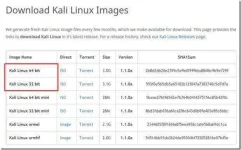
First we need to download Kali from You do not have permission to view the full content of this post. Log in or register now..
If you have a 64-bit capable computer (like me), then you probably will want the 64-bit version of Kali for performance reasons. Expand the drop down menu’s to find the version you need. Select the 64-bit version ONLY if you have a 64-bit computer.
Step 2:
If you don’t have a torrent program, then click on “ISO” next to the appropriate version of Kali and select “Save” when the download notification appears in your browser and save it to a easy to remember location.
If you do have a torrent program, then I highly recommend using the torrent option, as it is much faster. Click on “Torrent” next to the appropriate version of Kali and Save the “.torrent” file to an easy to remember/access location.
Now open your Torrent program (I use uTorrent), click
“Add new torrent,” select the “.torrent” file, and select the appropriate options to download it.
Now wait for Kali to download, this might take several hours, depending on your internet speed.
Step 3:
When Kali has finished downloading, open VMware Player and click Create a new virtual MACHINE.
NOTE*USE THIS WITH PERMISSION OF OTHERS WIFI IN WHICH YOU ARE TESTING THIS TESt
USE IT AT YOUR OWN RISK!!
First we need to download Kali from You do not have permission to view the full content of this post. Log in or register now..
If you have a 64-bit capable computer (like me), then you probably will want the 64-bit version of Kali for performance reasons. Expand the drop down menu’s to find the version you need. Select the 64-bit version ONLY if you have a 64-bit computer.
Step 2:
If you don’t have a torrent program, then click on “ISO” next to the appropriate version of Kali and select “Save” when the download notification appears in your browser and save it to a easy to remember location.
If you do have a torrent program, then I highly recommend using the torrent option, as it is much faster. Click on “Torrent” next to the appropriate version of Kali and Save the “.torrent” file to an easy to remember/access location.
Now open your Torrent program (I use uTorrent), click
“Add new torrent,” select the “.torrent” file, and select the appropriate options to download it.
Now wait for Kali to download, this might take several hours, depending on your internet speed.
Step 3:
When Kali has finished downloading, open VMware Player and click Create a new virtual MACHINE.
 try na din kung gusto nyu po
