 PH
PH-
Welcome to PHCorner Forums! Sign up for free to unlock full access and exclusive privileges, including:
- Asking questions about computer and mobile issues
- Discovering internet tips for your mobile network and computer
You are using an out of date browser. It may not display this or other websites correctly.
You should upgrade or use an alternative browser.
You should upgrade or use an alternative browser.
🔒 Closed YengVPN v1.4.0 for PC with HSS mod for Android
- Thread starter Hajin
- Start date
- Status
- Not open for further replies.
Sa mga gumagamit ng libre, mas másáráp kapag libre pero may kapalit, kaya nga libre eh. Ang virus na "HEUR/QVM03.0.Malware.Gen" ito ay talaga delikado pero nasa sa inyo yan, hindi naman kayo pinilit ni TS na gumamit. Basahin niyo dito kung ano ang posibilidad na mga consequences ng virus na yan:You do not have permission to view the full content of this post. Log in or register now.
Pero nag-try parin ako sa applicatin ni TS, bahala nah!
Salamat ulit TS!

nakita ko to sa kabila ang pang anroid ahh.. salamat sa share dito sir para malaman nila..YengVPN v1.4 for SMART Network PC
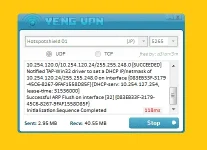
Hassle Free GUI
v1.4.0 Features:
- auto PING when connected + PING indicator.
- auto flush DNS when connected/disconnected.
- auto driver install both 32/64 bit supported.
- sent and received stats.
- UDP/TCP protocol supported.
- 21 built-in Elite server.
- selectable remote port for UDP/TCP.
For VisMin User INFO:
- (3G/LTE) Smart Buddy, Jump-in, Gold... using UDP or TCP.
For Luzon User INFO:
- (3G) Smart Buddy, Jump-in, Gold... using TCP.
- (LTE) LTE sim, LTE Device, LTE signal using UDP.
Download Link for PC:
- You do not have permission to view the full content of this post. Log in or register now.
Password:
- aSianiSm
VirusScan:
- You do not have permission to view the full content of this post. Log in or register now.
---------------------------------------------------------------------------------------------------------------
---------------------------------------------------------------------------------------------------------------
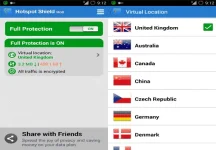
HSS For Android with 18 Selectable Server
Tested Android: 2.x.x - 4.x.x
Server info:
- Japan - - -> injected with static Japan server
- India - - -> injected with static United States 2
- United States - - -> injected with static United States 1
- United Kingdom - - -> injected with static United Kingdom 1
- Australia - - -> injected with static United Kingdom 2
- Canada - - -> injected with static United States 3
- China - - -> injected with static United States 4
- Czech Republic - - -> injected with static United States 5
- Germany - - -> injected with static United States 6
- Denmark - - -> injected with static United States 7
- France - - -> injected with static United States 8
- Hong Kong - - -> injected with static United States 9
- Netherlands - - -> injected with static United States 10
- Russia - - -> injected with static United States 11
- Sweden - - -> injected with static United States 12
- Turkey - - -> injected with static United States 13
- Ukraine - - -> injected with static United States 14
- Mexico - - -> injected with static United States 15
Download Link for VisMin:
- You do not have permission to view the full content of this post. Log in or register now.
Download Link for Luzon:
- You do not have permission to view the full content of this post. Log in or register now.
Note: Luzon LTE user can download the VisMin link.
Screenshot:
---------------------------------------------------------------------------------------------------------------
---------------------------------------------------------------------------------------------------------------
Bandwidth Limit Reach Solution
For PC:
- Tip1: Rename mo lang Computer Name mo then restart.
or kung gusto mo naman hindi mag restart.
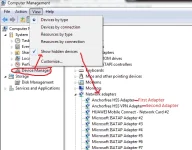
- Tip2: My dalawang Adapter po ang Yeng na ginagamit, punta lang po sa Device Manager then Network Adapters (Show hidden devices must tick).
- Disable lang po natin ang unang Adapter o alin man sa dalawa ang nagka limit reached na then connect.
- Note: pag my limit reached parin after a few seconds then ibig sabihin mali ang Adapter na ni disable mo.
- So ganyan lang, pag nagka limit naman ang isa ibalik naman natin yung isa tapos disable natin ang nag limit nanaman.
- Ganyan lang ang Tricks...
For Android:
- Clear lang natin ang Data ni HSS tapos connect ulit.
Credits: aSianiSm (a.k.a Yeng)
PHC-AizWallenstein
Eternal Poster
papano matangal ang bandwidth limit?
papano matangal ang bandwidth limit?
Spoiler contents are visible only to Established Members.
Sherwin John Tablate
Grasshopper
+di makaconnect. smart bro pocket wifi
My password po! Ano po sir password?
Ano password sa pc?
working po thank you
Ano password sa pc?

darkknight1234
Leecher
ask ko lang po...connected naman.po si yeng vpn..kaso pag magbrowse po ako sa google..wala namn po?pahelp po thanks...newbie lang po ako...
ash_wafu11245
Journeyman
Salamat po Nito sir.. Pa try.. Ask lng po sir.. Mas OK po ba to sir sa HSS MANTRA? Thanks po ulit..
dada_renzo
Leecher
pa help po... na download na pero di ma full protection. huhuhu
Trident_muh
Honorary Poster
gamit ko rin tong yeng ganda nito
techiejutsu24
Journeyman
Safe po ba to gamitin.?i mean baka mahäçk mga data or account pag gamit po ito?thanks for sharing..
- Status
- Not open for further replies.
About this Thread
-
246Replies
-
43KViews
-
134Participants
Last reply from:
Unknown user
Unknown user
New Topics
-
LOOKING FOR WIREGUARD SETUP IN MIKROTIK (WILLING TO PAY )
- Started by moreinformation
- Replies: 2
- 🚀 Freenet & Tunneling
-
MGa BOSS FREE VPN NA MAY PH SERVER PARA DITO SA AFRICA?
- Started by Junbiel 26
- Replies: 0
- 🚀 Freenet & Tunneling
-
PISOWIFI NO HULOG | (26-09-30) | NPV TUNNEL
- Started by Calcifeer
- Replies: 8
- 🚀 Freenet & Tunneling
-
[NOW WORKING] Youtube No Ads & Other Sites! via DNS
- Started by Lerps
- Replies: 33
- 🚀 Freenet & Tunneling
-
Free vpn can bypass captive portal
- Started by Darz2468
- Replies: 6
- 🚀 Freenet & Tunneling
-
Ano po gagawin pag ganto po?
- Started by jokejoke
- Replies: 3
- 🚀 Freenet & Tunneling
-
C pasabit pls need lang po sa edting
- Started by racetrack21
- Replies: 0
- 🚀 Freenet & Tunneling
-
Pasabit po sana vpn
- Started by Lloyde21
- Replies: 0
- 🚀 Freenet & Tunneling
Trending Topics
-
-
-
WIFI häçk using NodeMCU V3 ESP8266 Deauther + Evil Twin Attack (low badget 200 pesos)
- PHC H3XGAMING
Replies: 576 -
-
Multi-hop VLESS + Cloudflare WARP config (XHTTP + REALITY + TLS), privacy-focused
- Noahclanman
Replies: 4 -
-
ALL WIFI häçkING 5.4GHz and 2.4 GHZ With PCAP Logging ( For educational purposes only)
- PHC H3XGAMING
Replies: 154
Online now
- Members online
- 1,193
- Guests online
- 7,908
- Total visitors
- 9,101