 PH
PHveins31628
Forum Veteran
Try ninyo guyz to guyz without using applications
Procedures:
Step1: Open nyo lang to sa notepad then edit the file name, as ".bat" extension
Ex. Windows10Ac†ïvâ†ør.bat
Step2: Edit nyo yung File Type as "All Files" then save
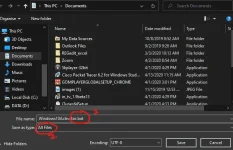
Step3: Then right click the file you save and run as administrator.
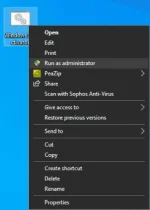
Step 4: Wait a few seconds
Step 5: Press Y, followed by Enter when prompted to restart your PC
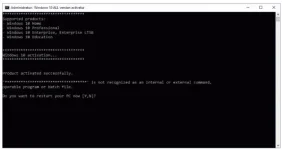
Note: The annoying prompts should go away after rebooting your computer. That means you have successfully activated your copy of Windows 10.
Heres the file
You do not have permission to view the full content of this post. Log in or register now.
You do not have permission to view the full content of this post. Log in or register now.
How to download
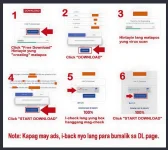
credits by boss Barts
Procedures:
Step1: Open nyo lang to sa notepad then edit the file name, as ".bat" extension
Ex. Windows10Ac†ïvâ†ør.bat
Step2: Edit nyo yung File Type as "All Files" then save
Step3: Then right click the file you save and run as administrator.
Step 4: Wait a few seconds
Step 5: Press Y, followed by Enter when prompted to restart your PC
Note: The annoying prompts should go away after rebooting your computer. That means you have successfully activated your copy of Windows 10.
Heres the file
You do not have permission to view the full content of this post. Log in or register now.
You do not have permission to view the full content of this post. Log in or register now.
Spoiler contents are visible only to Established Members.
How to download
credits by boss Barts
